5 Best AP Automation Tools for D365 Finance and Operations (2026)
Dynamics 365 Finance and Operations (D365 F&O) already does more for accounts payable than most...
ERP modernisation means moving finance off spreadsheets, disconnected tools and legacy accounting software onto one integrated ERP, then adding AI and automation on top. The order matters. AI needs clean, structured data, and the ERP is what gives it that. Get the foundation wrong and automation just makes the mess run faster.
That was the core message of our recent webinar with aclaros, an SAP Business One Platinum Partner in North America. James Kearns, Head of International Markets at Kefron AP, and Neal Johnie, Sales Director at aclaros, covered when to modernise, why AI projects fail, and what touchless purchase-to-pay (P2P) looks like for SAP Business One accounts payable teams in practice.
Here is what they said, and what finance leaders can take from it.
ERP modernisation is the shift from disparate systems, manual processes and spreadsheet reporting to an integrated ERP platform that acts as the single system of record for the business. A modern ERP covers the core modules (finance, accounting, inventory, purchasing, sales and production) and connects natively to specialist applications for everything else.
Neal described this as a best-of-breed strategy. No single system can be everything to everyone, so the ERP sits at the centre and industry-specific tools plug into it. For AP and purchase-to-pay, that means an ERP like SAP Business One with an AP automation platform like Kefron AP integrated directly into it.
He was also clear that technology is the catalyst, not the starting point. Digital transformation starts with people, culture and standardised processes. If your organisation hasn't done that work, no system will make it ready.
Disconnected spreadsheets, manual procure-to-pay processes and homegrown systems that don't talk to each other don't scale. Neal called it the spaghetti-string problem. The obvious cost is lost productivity. The less obvious costs are:
In Neal's experience, employees spend up to 20% of their time searching for or manually entering data, and for scaling businesses the cost of manual data management can overtake the cost of an ERP implementation within 18 months.
Plenty of companies run a full ERP evaluation and then decide to do nothing. For leadership, the status quo feels safe. Neal's view is that it is currently the highest-risk strategy available, because competitors using AI-driven ERPs are pricing faster and responding to customers faster.
Some teams also hold off because they think AI will let them build their own system. James's response: a manufacturing and distribution business probably shouldn't be spending time building an AP system or an ERP, with all the security and data concerns that come with it.
Neal split the warning signs into two levels: what's happening across the business, and what your team feels day to day.
| Signal | What it looks like |
|---|---|
|
Growing operational complexity |
Inconsistent processes and data silos across sites, entities or teams |
|
Demand for better reporting
|
Basic reports can't show performance by region, product or team |
|
Increasing regulatory requirements |
Compliance gets harder with every new country or region you trade in |
|
Excessive paperwork |
Frequent errors and too much time spent on documents |
|
Repetitive data entry |
The same information keyed into several systems |
|
Approval delays |
Slow, manual approvals that hold up suppliers and customers |
|
Inventory issues |
Stock discrepancies and repeated manual cycle counts |
|
Customer service lag |
Slow information retrieval drags out response times |
If you're on QuickBooks, Sage 50 or a similar entry-level package and recognise several of these, that's the tipping point for moving to an ERP like SAP Business One. Kefron's guide to the 10 warning signs your finance team needs AP automation covers the AP-specific signals.
Neal's framework for getting an ERP modernisation project off the ground:
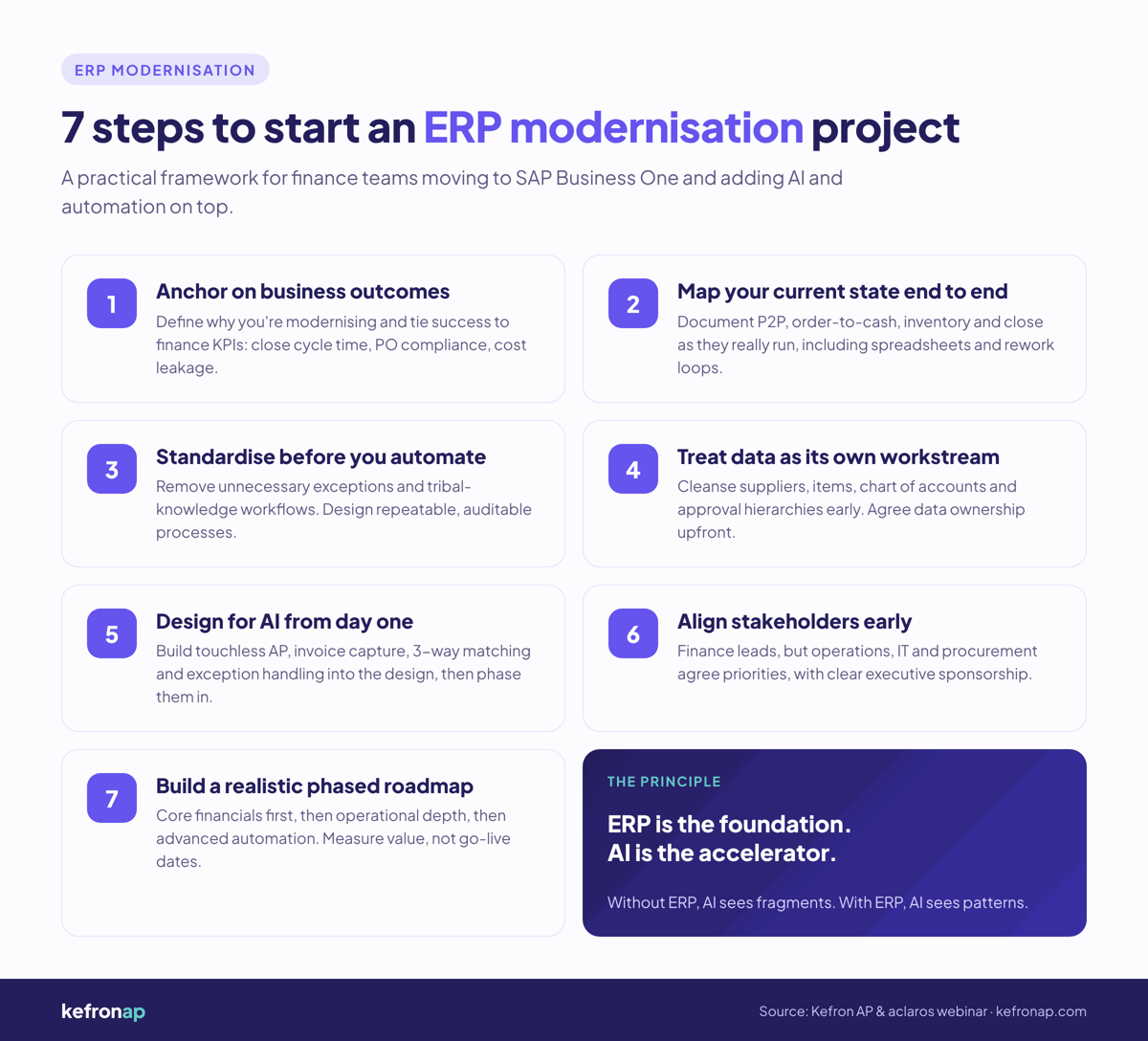
Every implementation starts with finance. SAP Business One is a financial accounting system at its core. Service businesses can often start with accounting and grow from there. For inventory and production businesses, Neal recommends phase one covers accounting and inventory with sales and purchasing, then production and MRP capabilities come later.
For a business moving from QuickBooks or similar, Neal puts a realistic timeline at four to six months from contract to go-live. It can be done in three, but training and data cleansing are the biggest tasks on the customer side and shouldn't be rushed.
The project team is usually three to five people: a sponsor who can make decisions (owner, president or CEO), an internal project manager (some customers bring in external support for extra capacity), and subject matter experts from finance, operations and sales.
James pointed to Gartner research suggesting around one in three AI projects fail. From his experience across AP and P2P projects, failure usually comes down to four things.
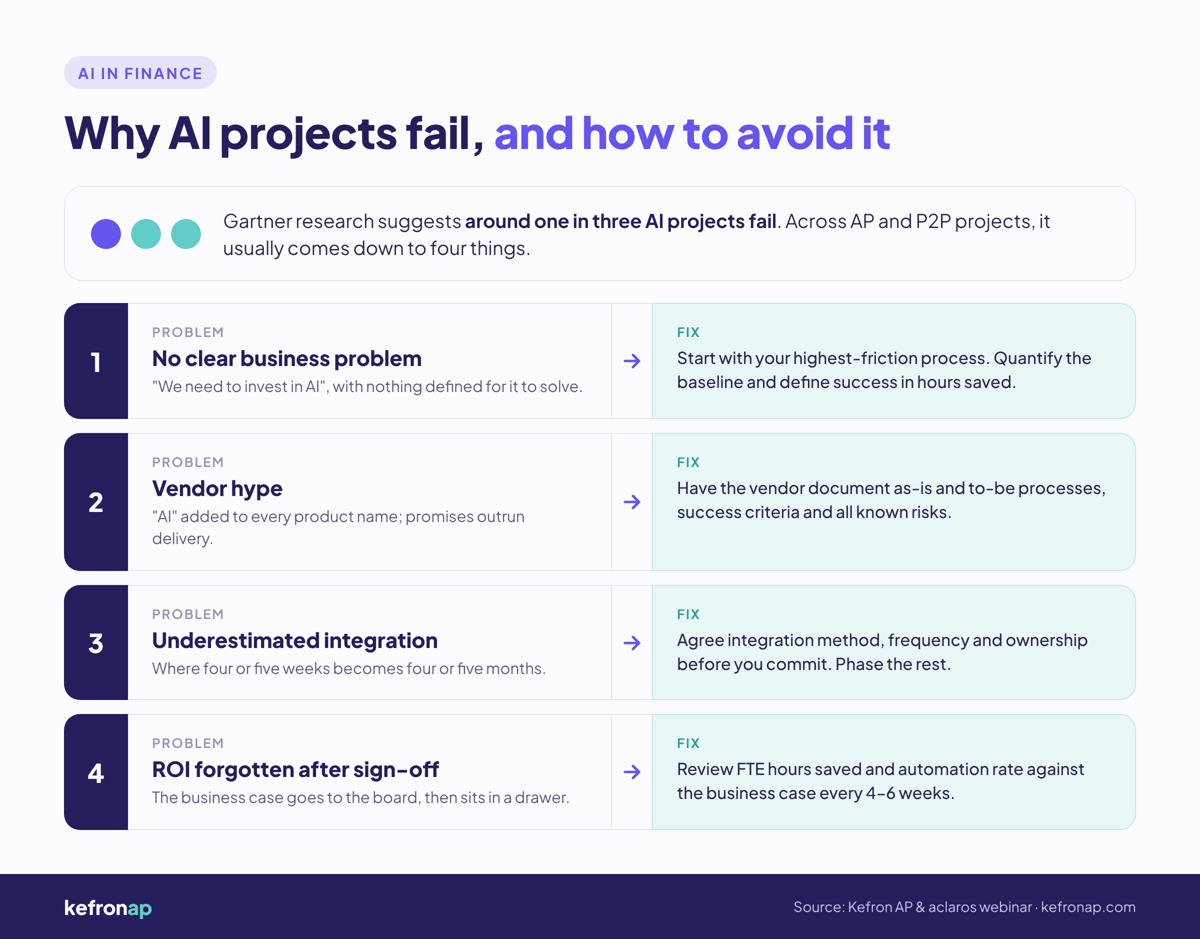
The board or management team says "we need to invest in AI", but nobody has defined what it's meant to solve:
Almost overnight, most AP vendors added "AI" to their product names and messaging. Some of it is genuine. Some isn't. We have seen plenty of customers arrive after abandoning a project because the vendor promised more than it delivered.
The fix is good documentation:
Integration is where a project goes from four or five weeks to four or five months. James's three areas to nail down before you commit:
Neal added that you don't need every scenario on day one. Start with the baseline integration points and grow into the rest. Phasing also builds buy-in: a champion inside the business can show the time saved in phase one before phase two starts.
Business cases get signed off, go to the board, then sit in a drawer. James recommends bringing the KPIs back up at every customer success check-in, every four to six weeks:
That keeps you accountable to the business, and keeps the vendor accountable too. For a full method, see how to measure AP automation ROI.
Most AP teams James and Neal speak to describe the same six problems:
James sees AI changing finance operations in three ways.
AI removes the repetitive work: data entry, GL coding and order matching. In an automated AP process, an invoice flows like this:
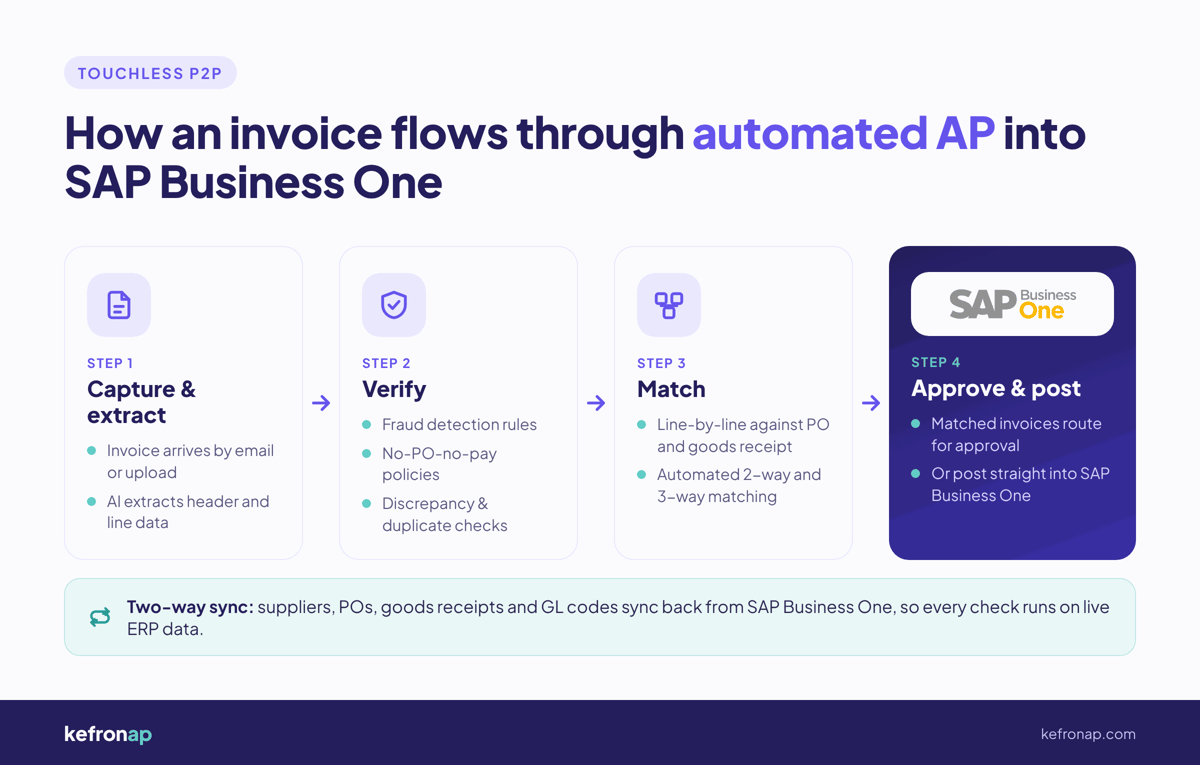
This is the part James is most excited about. Finance teams have put up with subpar reporting for years because the data sits in too many places. Conversational intelligence means asking your AP system a question in plain language and getting the answer in seconds, the same way you'd use ChatGPT, Copilot, Gemini or Claude.
For example: "Show me the top 10 suppliers who sent an invoice with a price increase in the last 30 days." No custom dashboard request, no CSV export. Kefron AP's AI Report Centre is built for exactly this, alongside the existing AP analytics dashboards.
Scaling businesses usually don't want a smaller finance team. They want the same team doing more valuable work. James's question for finance leaders: what would your team do with an extra day a week?
James covers more of what finance leaders are telling us in AI in finance: what finance leaders are telling us.
There is no single right touchless rate. It depends on how your business receives goods and services, and which invoices you want a person to check. Kefron AP customers typically see 70–90% touchless processing for recurring suppliers, but the number that matters is the one that fits your controls.
Two mutual Kefron and aclaros customers on SAP Business One show the range:
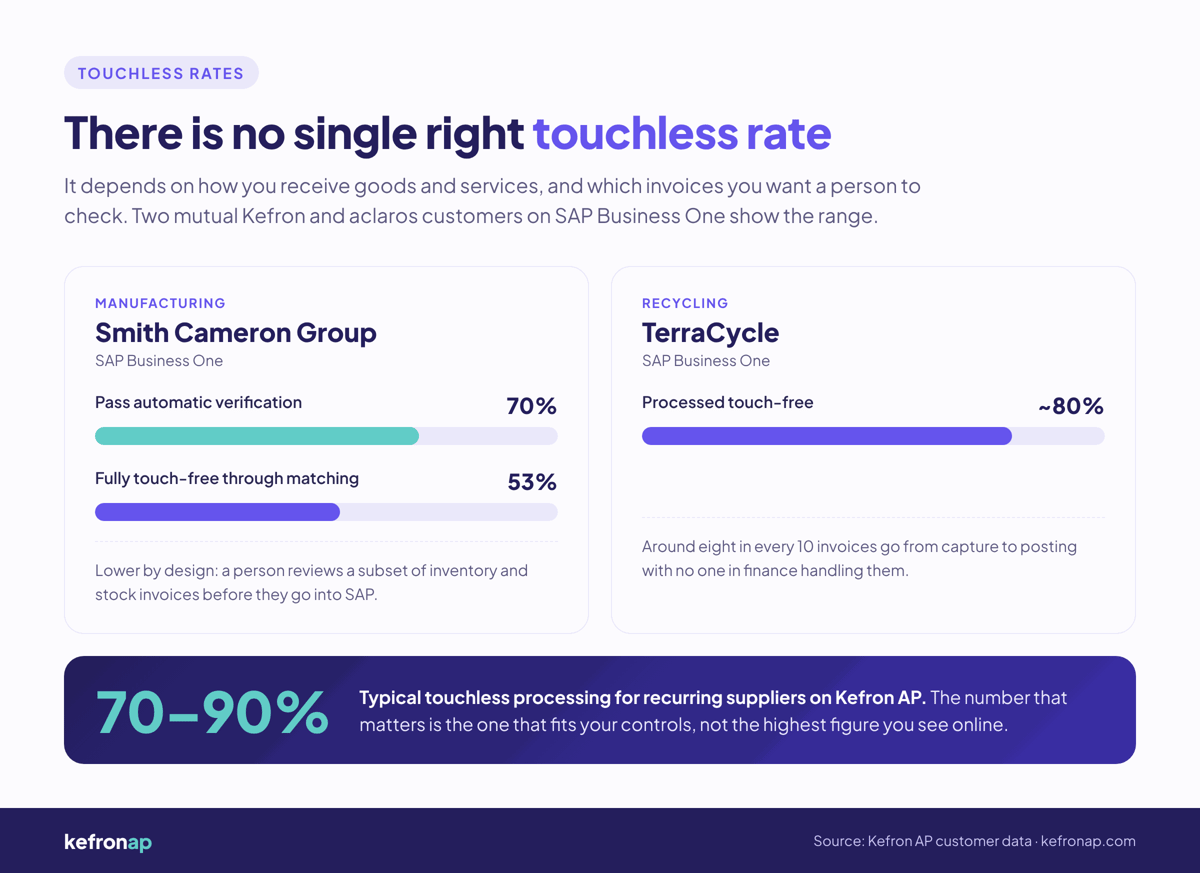
James's point: you'll see claims of 80–90% touch-free automation everywhere online. That doesn't mean it's achievable or even desirable for your business case. For benchmarks and how to calculate your own rate, see touchless invoice processing rates in 2026.
Kefron AP integrates directly with SAP Business One, as well as SAP S/4HANA and SAP ECC6. It captures, codes, matches and routes invoices for approval, then posts them into SAP Business One, with suppliers, POs, goods receipts and GL codes synced back from the ERP. AI extraction combined with human validation delivers 99%+ data accuracy.
For mutual customers, Kefron and aclaros agree ownership of each part of the integration upfront, so the SAP Business One side and the AP side move together. If you're scoping a project, start with these key questions on AP automation for SAP.
Pricing is straightforward. Kefron AP charges a fixed monthly subscription based on your invoice volume band, so you can budget and see exactly what you'll pay as volume grows. Implementation is a one-off fee. There are no per-user fees. See how Kefron AP pricing works.
Comparing options? See our breakdown of the best AP automation for SAP Business One.
Neal closed the session with the line that sums it up: without ERP, AI sees fragments. With ERP, AI sees patterns.
If you're still on a legacy system and planning to automate AP first, James's advice is to be honest about whether you're just kicking the harder decision down the road. Get the ERP right, standardise the process, clean the data, then let automation do its job.
Already on SAP Business One and want to see what touchless AP looks like on your own invoices? Book a Kefron AP demo.
ERP modernisation is moving a business from disconnected systems, spreadsheets and legacy accounting software to an integrated ERP that acts as the single source of truth for finance, inventory, purchasing, sales and operations. Specialist tools, such as AP automation, then integrate directly into the ERP.
If your ERP is legacy and due to be replaced, automating AP first often delays the harder decision. AI and automation work best when the ERP is the central system of record. If you already run a modern ERP like SAP Business One, adding AP automation is the logical next step.
For a business moving from QuickBooks or a similar package, a realistic SAP Business One implementation takes four to six months from contract to go-live. It can be done in about three months, but training and data cleansing need enough time to be done properly.
AP automation is usually live in weeks, not months, when the integration method, data mapping and ownership are agreed upfront. Kefron AP implementations typically take three to six weeks, depending on invoice volume, entities and approval complexity.
Bad data is the number one reason ERP projects underperform. Other common causes are automating processes before standardising them, unclear business outcomes, poor stakeholder alignment, and treating ERP as an IT project rather than a business transformation.
Four reasons come up most often: no clearly defined business problem, vendor hype that sets the wrong expectations, integration that is underestimated, and ROI that nobody tracks after the business case is signed off.
Touchless invoice processing is when an invoice is captured, verified, matched to its purchase order and approved for payment without anyone in the finance team handling it. The touchless processing rate is the percentage of invoices processed this way.
It depends on your receiving process and controls. Kefron AP customers typically see 70–90% touchless processing for recurring suppliers. Some businesses choose a lower rate on purpose, for example to keep a manual check on inventory invoices.
No. Kefron AP is built for mid-market and enterprise finance teams on ERPs such as SAP Business One, NetSuite, Microsoft Dynamics 365, Sage, Oracle, Infor and Unit4. It does not integrate with QuickBooks or Xero.
Kefron AP uses a fixed monthly subscription based on invoice volume bands, plus a one-off implementation fee. There are no per-user or per-approver charges, so cost tracks the work you process rather than headcount.
Usually three to five people: a project sponsor with decision-making authority, an internal project manager, and subject matter experts from finance, operations and sales. IT input is needed for access and sign-off on the integration.