The Complete Guide to Cost Per Invoice in 2026
Every finance leader knows that processing invoices costs money. Fewer can say exactly how much...
Your touchless invoice processing rate tells you something no other AP metric does: how much of your invoice volume your team never has to look at. An invoice that arrives, gets captured, coded, matched, approved, and posted to your ERP without a person opening it is a touchless invoice. The percentage of invoices that complete that full journey without human intervention is your touchless rate.
For mid-market finance and accounts payable leaders, this metric has become the clearest signal of whether AP automation is actually working or just digitising manual steps. This guide covers what touchless invoice processing means in practice, what a strong rate looks like, where invoices stall, and how to move your rate upward with the right combination of process discipline and technology.
By the end, you will have a framework for measuring, benchmarking, and improving your own touchless rate, grounded in industry data and operational specifics rather than vendor marketing.
Touchless invoice processing means an invoice completes every step of the accounts payable workflow without a person intervening. The invoice arrives via email, EDI, XML, or scanned paper. Software captures the data using Optical Character Recognition (OCR) and machine learning. The system validates extracted fields against business rules, matches the invoice to a purchase order and goods receipt, applies GL coding, routes it through approval workflows, and queues it for payment.
No manual data entry. No manual coding. No manual approval for routine transactions. The human role shifts entirely to managing the exceptions the system cannot resolve on its own.
The terms "touchless invoicing," "no-touch processing," and "straight-through processing" describe the same outcome. Straight-through processing is the broader term, used across payments, loan files, and claims as well as invoices. In AP, an invoice qualifies as touchless when every automated check passes and no person needs to intervene at any stage.
AP automation is the broad category of digitising accounts payable workflows. Touchless processing is the subset where invoices flow from receipt to payment without human intervention. Many organisations have adopted automated invoice processing but still require manual touches on most invoices because of extraction errors, matching failures, or routing gaps.
The distinction matters because a high automation adoption rate does not guarantee a high touchless rate. According to the Ardent Partners State of ePayables 2025 report, 73% of AP departments now use some form of invoice automation. Yet only 22% qualify as best-in-class on touchless and cost performance. Automating individual steps without connecting them end to end leaves manual gaps that prevent straight-through flow.
Touchless rate (%) = (invoices processed with zero human touches ÷ total eligible invoices processed) × 100
If your team processes 2,000 eligible invoices in a month and 600 flow straight through, your touchless rate is 30%.
The word "eligible" is where measurement discipline comes in. A metric that includes every invoice regardless of PO status, risk profile, or supplier maturity tells a different story from one limited to invoices designed to follow a straight-through path.
Break the calculation down by invoice type. PO-backed invoices should achieve a higher touchless rate than non-PO invoices, because the purchase order provides reference data for automated matching. Recurring invoices from established suppliers should process at higher rates than one-off invoices from new vendors.
Track the rate by supplier, exception type, and invoice channel. Your top 20 suppliers by volume likely have a much higher touchless rate than your long-tail vendors. Segmenting reveals where targeted improvements will yield the largest gains.
If a person reviews an invoice after auto-entry, corrects a field, changes coding, or approves the invoice outside the normal policy path, decide whether that resets the touchless count. The rule matters less than applying it consistently. Inconsistent counting turns the metric into a story rather than a control measure.
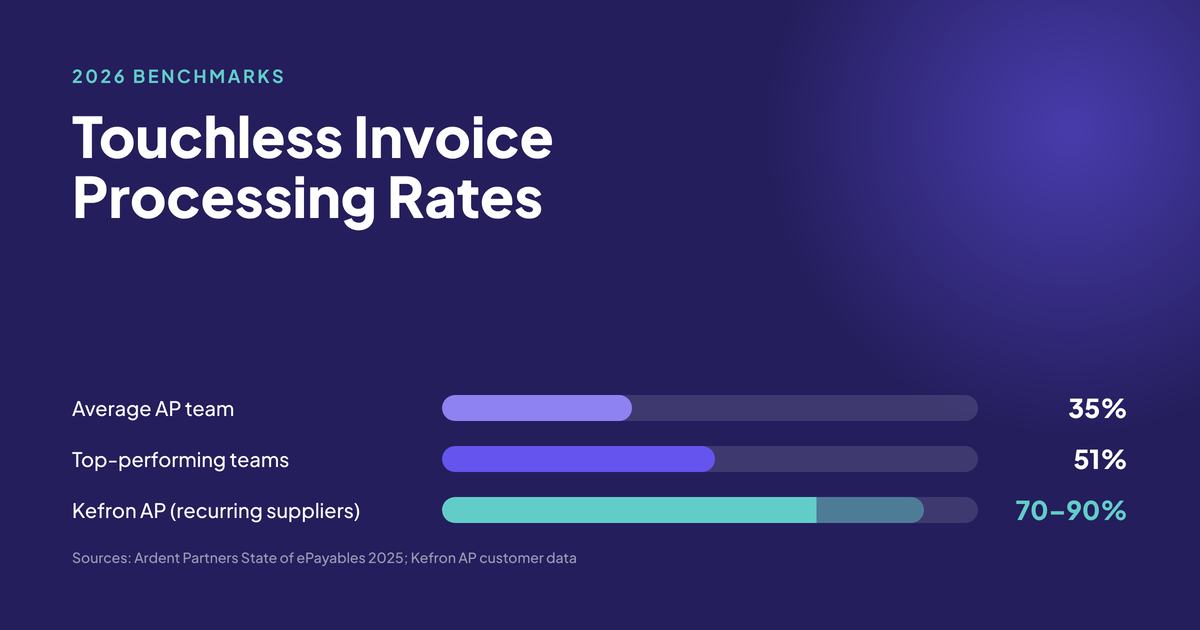
For most mid-market AP teams, a touchless rate above 50% is good and above 70% is advanced. The average AP team processes 35.4% of invoices straight through, while top-performing teams reach 51.0%, according to Ardent Partners' State of ePayables 2025.
Industry benchmarks give you a starting point, but the right target depends on your invoice volume, vendor mix, and document complexity. Here is where the data currently stands.
The Ardent Partners State of ePayables 2025 report found that AP teams processed 35.4% of invoices straight through on average. The top-performing 20% of teams, defined by lowest cost and fastest cycle times, reached 51.0%. Those same top teams linked 84.0% of their invoices to a purchase order, compared with 47.3% for all other teams.
The Hackett Group's 2025 Accounts Payable Digital World Class Matrix found that customers of leading AP solutions averaged a 60% touchless invoice processing rate and 59% faster AP cycle times. Companies running at 30% touchless or higher had, on average, 3.5X higher AP productivity.
| Touchless Rate | Maturity Stage | What It Means |
|---|---|---|
| Below 20% | Early-stage automation | Invoices are captured digitally, but most still require manual intervention at some point. |
| 20% to 50% | Partial automation | Top suppliers process cleanly, but format variability, missing POs, and GL coding exceptions keep the rate below half. |
| 50% to 70% | Mature automation | Vendor onboarding is strong, matching rules cover most scenarios, and exception handling is efficient. |
| Above 70% | Advanced automation | AI-driven extraction handles format variability, predictive GL coding is in place, and intelligent routing is active. |
Kefron AP customers with established supplier bases consistently achieve rates in the 70 to 90% range for recurring vendors. That performance comes from combining AI-powered invoice data extraction at 99%+ accuracy with a dedicated Data Assurance Team that validates uncertain fields in real time.
A touchless invoice is not produced by one feature. It is the result of several AP layers agreeing that the invoice is safe to move forward without human intervention. Understanding these layers helps you identify where your own invoices stall.
Invoices arrive via email, EDI, XML, or scanned paper. If your intake process still requires someone to monitor an inbox and forward attachments manually, that is a human touch before automation even begins. Electronic submission from suppliers is a prerequisite for high touchless rates, because paper invoices introduce scanning steps and increase capture error rates.
The extraction layer converts the invoice document into structured data: vendor name, invoice number, date, line items, quantities, amounts, and tax codes. Basic OCR reads text from a fixed template. AI-powered extraction learns from invoice variations over time, adapting to new supplier layouts without manual template configuration.
First-pass extraction accuracy determines how much of the downstream process runs automatically. At 90% accuracy, a team processing 10,000 invoices a month still manually corrects 1,000 of them. At 99%, that falls to 100. Kefron AP delivers 99%+ accuracy by combining AI extraction with human validation, which is the mechanism that enables consistently high touchless processing rates.
Validation checks confirm that the extracted data is internally consistent and complete. Is the invoice date within a reasonable range? Does the total equal the sum of line items plus tax? Has this invoice number been submitted before?
Duplicate invoice detection is one of the highest-return applications of AP automation. Kefron AP's multi-layer duplicate detection compares each incoming invoice against historical records across supplier, invoice number, amount, and date, checking for near matches as well as exact ones. A three-step verification process flags discrepancies before payment reaches the supplier.
Three-way matching compares the invoice against the purchase order and the goods receipt note. The system verifies that what was ordered, received, and billed all align before routing the invoice for approval. Tolerance thresholds handle immaterial variances, such as rounding differences or freight estimates, so they do not flag every invoice for human review.
Kefron AP performs line-level AI matching with prompts that identify discrepancies automatically. Matched invoices proceed; genuine exceptions route to the person who can resolve them.
Before an invoice reaches an approver, it needs to be assigned to the correct general ledger account, cost centre, department, and location. AI-driven GL coding learns from historical transaction patterns, recognising that invoices from a specific supplier consistently go to a specific GL code and applying that automatically.
Auto-coding accuracy is a gating factor for touchless processing of non-PO invoices. Organisations that achieve high touchless rates for non-PO invoices typically have clean, well-maintained GL structures and sufficient transaction history for the machine learning models to draw from.
Automated approval routing sends each invoice to the correct approver based on configurable rules: cost centre, vendor, amount threshold, or entity. If no action is taken within a defined period, the system escalates to a backup approver. The invoice stops only when the approval rules require human judgement, not because the routing failed.
If touchless processing were straightforward, every AP team would already be there. Invoices stall at predictable points. Understanding those friction points tells you where your automation has gaps.
Three-way matching requires something to match against. When vendors do not reference a PO, or reference the wrong one, the match fails and the invoice routes to manual review. This is one of the most common reasons invoices require human intervention. Increasing PO coverage across your purchasing categories is the single most impactful step you can take to raise your touchless rate.
Your largest vendors might send structured EDI files or well-formatted PDFs. But mid-tier and long-tail vendors often send invoices as email attachments, scanned images, or inconsistent layouts. Each format variation creates an extraction challenge. Template-free, self-learning extraction engines address this by adapting to new formats without manual configuration.
A single vendor might supply items coded to five different accounts. The correct code might depend on the department, the project, or the nature of the expense. Rules-based coding handles the predictable cases, but edge cases accumulate. Predictive coding based on historical patterns resolves a larger share of these automatically.
Even when data extraction and matching succeed, invoices stall in approval queues. A manager is unavailable. The threshold rules do not account for a recent organisational change. The system does not know who approves capital expenses for a newly created cost centre. These are workflow configuration gaps, not document problems.
If vendor records are duplicated, incomplete, or inconsistent, the system cannot reliably match invoices to vendors or POs to receipts. Cleaning vendor master data is prerequisite work for high touchless rates, not something to address after go-live. Organisations that skip it build on a foundation that generates exceptions from day one.
Improving your touchless rate requires targeted changes across extraction, validation, and workflow. It is not a single project. Organisations that reach advanced rates get there through disciplined, incremental improvement.
Before changing anything, identify where invoices leave the automated path. Tag each invoice with the reason it required human involvement: manual data entry, GL code override, PO match failure, amount discrepancy, unrecognised format, or missing vendor information. The distribution of these reasons tells you which lever to pull first.
Identify the invoice population most amenable to touchless processing: high-volume PO-backed invoices from established suppliers who submit electronically. Optimise the touchless rate for this population first. Early wins demonstrate the model and build confidence across the finance team.
Work with procurement to convert informal purchasing to PO-based purchasing, starting with the highest-volume categories. Every category that moves to PO-based purchasing unlocks three-way matching and touchless potential. For a step-by-step rollout framework, Kefron's AP implementation guide covers the phased approach.
If the same suppliers, same categories, or same exception types keep appearing, fix the cause rather than processing the exceptions faster. Common root causes include vendors who consistently invoice at prices different from the PO, goods receipts that are posted late, vendor master records with incorrect information, and tolerance thresholds that are miscalibrated for specific categories.
Rules-based OCR breaks when formats change. AI-powered extraction adapts to new layouts without reprogramming. The difference shows in the long tail: the hundreds of vendors who each send a small number of invoices in unique formats. Kefron AP's template-free AI extraction learns from every correction, improving accuracy for each supplier over time without manual setup.
Not every minor discrepancy needs human review. Setting intelligent tolerances for price, quantity, and tax rounding eliminates the low-value exceptions that clog your queue without introducing financial risk. Most organisations set tolerances between 1% and 3% of invoice value. Review thresholds quarterly and adjust by category based on actual exception analysis, not uniform rules applied across all spend.
Automated approval routing is only as strong as the rules it runs on. An organisation that configures routing rules once and never updates them as its structure changes will see exceptions accumulate. Routing rules should be straightforward to update without scripting, so the workflow stays aligned with the business as it grows, acquires, or reorganises.
The extraction stage is where most touchless chains break. If the system cannot accurately read an invoice regardless of format, every downstream step requires human involvement. This is why first-pass accuracy is the metric that separates organisations with high touchless rates from those stuck below 30%.
Kefron AP addresses this with a combination of AI-powered extraction and a dedicated Data Assurance Team. The AI engine reads header and line-item data from any format: PDF, scanned paper, XML, EDI, or email attachment. Where the model is uncertain about a specific field, the Data Assurance Team validates it in real time rather than passing it through unchecked or routing the entire invoice to the AP team.
This "AI plus human" approach delivers 99%+ accuracy after validation. That accuracy level is the mechanism that enables Kefron AP customers to reach 70 to 90% touchless rates for recurring suppliers, because fewer invoices generate exceptions at the capture stage, and fewer exceptions mean fewer manual touches downstream.
Not every invoice should be touchless. An invoice with missing data, a supplier mismatch, a duplicate risk, tax uncertainty, out-of-policy spend, or a field with low extraction confidence should stop. Sending that invoice straight through is not operational efficiency. It is weak control design.
Strong automation reduces avoidable manual work while preserving review where review protects the business. It removes rekeying, standardises extracted fields, applies known rules, and routes invoices to the right person when the invoice falls outside those rules.
Your touchless rate should sit beside exception rate, first-pass accuracy, invoice cycle time, and audit quality in your broader AP KPI scorecard. A rising touchless rate is only good news if payment accuracy, policy compliance, and audit evidence stay strong.
An AP automation platform that connects to your ERP only at the point of final invoice posting still requires manual handling at earlier stages. Deep ERP integration means supplier data, PO data, GL codes, cost centres, and approved invoice data all sync bidirectionally in real time.
When your AP platform pulls PO and goods receipt data directly from the ERP, the matching step runs against live reference data rather than stale exports. When approved invoices post back automatically, the payment team works from current information. Each connection point that runs in real time removes one more potential manual touch.
Kefron AP integrates with over 70 ERP and finance systems, including SAP, Oracle, Microsoft Dynamics, NetSuite, Sage, and AccountsIQ. Integration runs either through a direct API or through Kefron Konnect, a secure low-code SFTP file transfer. The goal is reliable data sync that keeps your AP workflow connected to your financial system of record without manual imports or rekeying.
Touchless rate does not operate in isolation. Track it alongside these complementary metrics to get the full picture of your AP performance.
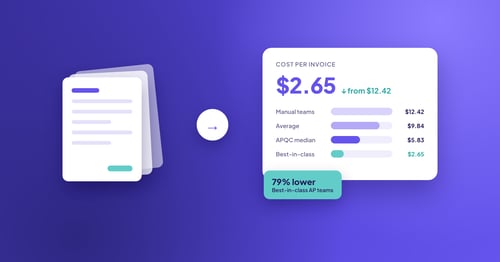
Cost per invoice measures the total cost, including labour, technology, and overhead, to process each invoice. Manual processing averages roughly $15 to $16 per invoice. Fully automated touchless processing brings that closer to $2 to $3. The gap between partial automation and touchless processing is where most savings reside.
Invoice cycle time tracks the elapsed time from invoice receipt to payment approval. The Ardent Partners 2025 data shows a best-in-class cycle time of 3.1 days versus an all-buyer average of 10.9 days.
Exception rate captures the percentage of invoices requiring manual intervention. Best-in-class organisations run at about 9%, compared with a 14% average. Every exception that recurs is an opportunity to fix the root cause or adjust automation rules.
First-pass accuracy measures what percentage of invoice fields are extracted correctly without manual correction. This is the upstream metric that drives touchless rate. Kefron AP's AI and Data Assurance model delivers 99%+ accuracy after validation, so uncertain fields are corrected before they reach your AP team.
Duplicate prevention rate tracks how many duplicate invoices are caught before they re-enter the workflow. Multi-layer detection protects against both exact and near-duplicate submissions.
The financial case for improving your touchless rate rests on three measurable outcomes: lower cost per invoice, faster cycle times, and freed AP capacity. These are not abstract projections. They are operational outcomes that compound as the rate climbs.
If your team processes 3,000 invoices a month and your current touchless rate is 25%, that means 2,250 invoices require some form of human touch. Moving that rate to 70% reduces the manually handled volume to 900 invoices, freeing your team to focus on the exceptions that genuinely need judgement rather than routine data processing.
Faster cycle times also unlock working capital benefits. When approval happens in hours rather than days, your finance team gains a genuine choice about when to pay. You can manage days payable outstanding (DPO) deliberately, capture early payment discounts where suppliers offer them, and maintain stronger supplier relationships through consistent, on-time payments.
For a structured framework to calculate these returns at your specific invoice volume, Kefron's AP invoice processing guide covers the full workflow from receipt to payment and shows where automation delivers its compounding returns.
Your touchless invoice processing rate is the metric that tells you what proportion of your AP volume your team no longer has to handle manually. It is not a single feature you buy. It is a measured operating outcome created by reliable data, defined rules, strong controls, and exception design that stops the right invoices before they become payment errors.
Start by measuring where you stand today, segmented by invoice type and supplier. Identify the most common exception reasons and fix them at the root cause. Prioritise PO coverage, vendor data quality, and first-pass extraction accuracy as the three foundations of a high touchless rate. Track progress monthly, and adjust tolerance thresholds and workflow rules based on what the data shows rather than assumptions.
The organisations achieving advanced touchless rates are not using fundamentally different technology. They are applying disciplined, incremental process improvement on top of AP automation that connects every stage of the invoice cycle. That combination is what turns a digitised AP function into one that genuinely runs itself for the majority of invoices.
A touchless invoice processing rate is the percentage of invoices that complete the full AP workflow, from receipt to payment approval, without any human intervention. You calculate it by dividing invoices processed without manual touches by total invoices processed. Kefron AP helps finance teams track this metric by surfacing touchless performance data across suppliers and invoice types.
A touchless rate above 50% indicates mature automation. The Ardent Partners State of ePayables 2025 report found that top-performing AP teams reach 51% on average. Kefron AP customers with established supplier bases consistently achieve 70 to 90% for recurring vendors, driven by 99%+ extraction accuracy and AI-powered PO matching.
PO coverage directly determines how many invoices have reference data for automated three-way matching. The Ardent Partners 2025 data shows top AP teams link 84% of invoices to a purchase order, compared with 47.3% for others. Without a PO, the invoice cannot be matched automatically, which means it routes to manual review regardless of extraction quality.
Yes, but at lower rates than PO-backed invoices. Non-PO invoices rely on AI-driven GL coding rather than PO matching to move through the workflow automatically. Kefron AP applies coding automation that learns from your historical transaction patterns, assigning the correct GL code, cost centre, and department without manual input for invoices that follow established patterns.
Extraction accuracy is the upstream metric that drives your touchless rate. Every invoice where the system misreads a field becomes an exception that requires human correction. Kefron AP combines AI-powered extraction with a dedicated Data Assurance Team to deliver 99%+ accuracy after validation, which is the mechanism that reduces exceptions and enables higher straight-through processing rates.
Most organisations see meaningful improvement within three to six months of targeted effort. Quick wins come from standardising formats with your top vendors and adjusting matching tolerances. Deeper gains from AI-driven extraction and predictive coding take longer to mature but build on each other as the system processes more invoices and learns from corrections.