AI In Finance: What Finance Leaders Are Telling Us
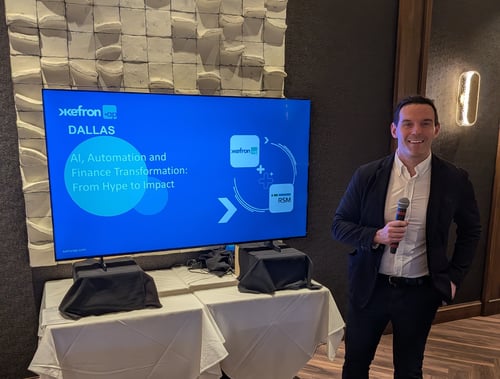
Last week we hosted AI, Automation and Finance Transformation: From Hype to Impact in Dallas with...
Three-way matching is the accounts payable control that compares every supplier invoice against its purchase order and goods receipt before payment is released. For mid-market finance teams processing thousands of invoices each month, this single check prevents overpayments, catches billing errors, and blocks fraudulent invoices before they reach your bank account. Yet accounts payable automation research consistently shows that a majority of finance teams still run this process manually, leaving money on the table and exposing the business to avoidable risk.
This guide covers everything you need to know about automating three-way matching for PO-based invoice workflows: how the process works step by step, where manual matching breaks down, how to configure tolerances and exception handling, and what a successful implementation looks like from planning through continuous improvement. If you want the shorter version focused on approvals, read how three-way matching automates AP approval.
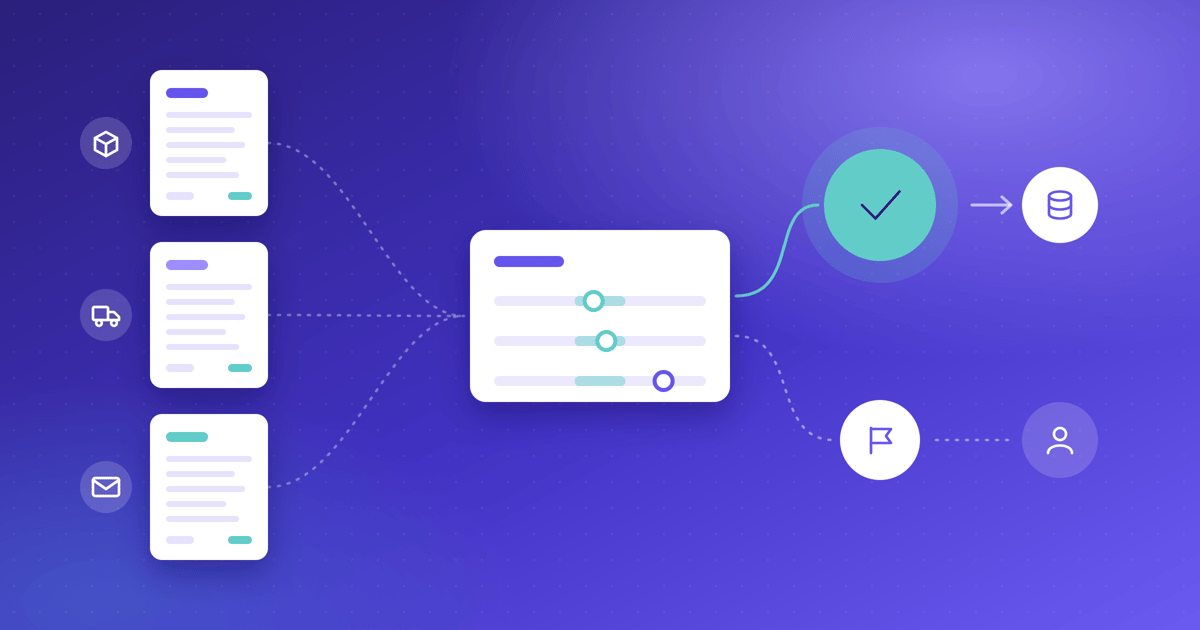
Three-way matching is an internal control process that cross-references three documents before approving an invoice for payment: the purchase order (PO), the goods receipt note (GRN), and the supplier invoice. Payment is released only when all three agree on item descriptions, quantities, unit prices, and total amounts.
The logic is straightforward. A PO confirms what was ordered and at what price. The GRN confirms what was physically received and accepted. The invoice shows what the supplier is billing. No single document, on its own, proves a payment is justified. Only when all three corroborate each other can your finance team be confident that money is leaving the business for the right reasons.
This differs from two-way matching, which checks only the invoice against the PO without confirming delivery, and four-way matching, which adds a quality inspection report. For most mid-market organisations handling physical goods or services with defined deliverables, three-way matching is the appropriate standard.
Mid-market organisations face a specific challenge. Invoice volumes are high enough to create real exposure, but finance teams are typically lean. When an invoice slips through with an incorrect quantity or an outdated price, the consequences go beyond a balance sheet entry. Your team's credibility within the organisation is at stake, supplier relationships can fracture, and audit findings pile up.
According to the IFOL Accounts Payable Automation Trends 2025 report, 66% of AP teams still manually enter invoice data into their ERP systems. That level of manual handling introduces errors at every stage: transposed digits, missed line items, and inconsistent tolerance judgments.
Three-way matching addresses four critical risk areas. It prevents overpayments by catching quantity and price discrepancies before payment. It blocks unauthorised purchases by requiring a valid PO. It detects vendor billing errors and duplicate invoices. And it creates a documented audit trail that satisfies internal and external auditors alike.
The process follows a consistent sequence across the procure-to-pay cycle. Understanding each step is essential for configuring automation correctly.
A business need triggers a purchase requisition. Once approved through your authorisation hierarchy, procurement issues a PO recording the items or services, quantities, agreed unit prices, delivery schedule, and payment terms. The PO number becomes the anchor for every subsequent matching step.
When the supplier delivers, your receiving team inspects the shipment against the packing slip and PO. They record a goods receipt note confirming what was received, in what quantity and condition, and on what date. Late or missing receipt entry is one of the most common causes of match failure.
The supplier issues an invoice referencing the PO number. Your AP system captures the invoice data through OCR and AI extraction, replacing manual keying with structured data. Kefron AP, for example, uses AI-powered extraction plus a dedicated data assurance team to achieve 99% accuracy after validation.
The system compares the invoice line by line against the PO and the goods receipt. Fields checked include supplier details, PO references, item descriptions, quantities ordered versus received versus invoiced, unit prices, extended totals, taxes, and payment terms.
Few organisations demand a match to the penny. Most define tolerance thresholds (for example, price variances within 2% or quantity variances within 5%) inside which small discrepancies are automatically accepted. Variances within tolerance pass; variances outside tolerance create an exception.
When a match fails, the invoice is blocked and routed to the appropriate resolver: a buyer for price discrepancies, the receiving team for quantity issues, or the supplier for billing errors. The exception is investigated, corrected, and re-matched.
Once all three documents reconcile, the invoice is approved and paid per the agreed terms. The full set of documents, match results, and approvals is retained as the audit trail.
Manual matching works in theory. In practice, it breaks down at scale. Here are the failure points that mid-market finance teams encounter most often.
Manually matching an invoice can take minutes to days when documents must be chased across departments. Invoices miss payment terms, early-payment discounts lapse, and late fees accumulate. According to Ardent Partners' research, the average cost to process a single invoice is $9.40, and manual processes push that figure significantly higher. Our guide to cost per invoice breaks down where those costs come from.
Manual data entry and visual comparison invite transposed digits, missed line items, and inconsistent judgment. The IFOL 2025 report found that manual data entry and data errors remain the top challenges for AP teams globally, affecting not just operations but broader business performance.
Paper and email-based processes lose documents, obscure approval history, and turn audit preparation into a scramble. When a Censuswide survey of 200 UK finance leaders commissioned by Kefron found that 69% agreed manual AP processes make it harder to scale finance operations, weak document management was a recurring theme.
Without systematic tolerance thresholds, AP clerks either escalate everything or apply personal judgment inconsistently. One path buries the team under trivial exceptions; the other weakens the control. Neither outcome protects your organisation effectively.
Tolerance configuration is where matching discipline becomes practical. Set thresholds too tight, and your team drowns in false positives. Set them too loose, and material discrepancies slip through. Getting this right is one of the highest-value decisions in your AP automation implementation.
For quantity variances, a starting threshold of plus or minus 5% (or 2 units, whichever is greater) accounts for minor counting differences and breakage. Unit price variances typically warrant a 2% threshold, allowing for rounding and contract price adjustments. Total amount variances at 3% provide an overall accuracy check without triggering constant exceptions.
Effective tolerance management is not one-size-fits-all. Manufacturing environments typically require tighter thresholds (2 to 3%) due to precision requirements. Retail and distribution operations can use moderate tolerances (around 5%) for high-volume receiving. Service-based purchases may allow looser tolerances (up to 10%) for estimated quantities.
Vendor reliability matters too. Strategic vendors with excellent track records can operate with wider tolerances. New or high-risk vendors should start with tighter controls. Problem vendors should sit at zero tolerance until issues are resolved. Kefron AP supports configurable match rules and tolerance settings that you can adjust by vendor, category, or amount threshold.
Exceptions are inevitable. The goal is not to eliminate them entirely but to route each one to the right person with the right context for fast resolution. Here are the most common exception types and how to handle them.
Your supplier ships 950 of 1,000 units ordered, but invoices for the full 1,000. The system flags the quantity variance and offers three resolution paths: partial payment for what was received, a corrected invoice from the supplier, or PO closure if the remaining units will not be delivered. Paying only for what was received protects your working capital and prevents overpayment.
The invoice lists a unit price that exceeds the PO price, perhaps because a negotiated discount was not reflected. The system routes this to procurement, who contacts the supplier for a corrected invoice or applies the agreed pricing. Catching this before payment avoids the slow, often unsuccessful process of post-payment recovery.
An invoice arrives referencing a valid PO, but no goods receipt exists. The system holds the invoice and prompts the receiving site. Investigation may reveal the shipment arrived but was never posted, or it may surface a genuine non-delivery. Either way, payment is blocked until the receipt is confirmed.
Service POs present a unique challenge because there is no physical delivery to receipt. The solution is to use a service acceptance record, such as a signed timesheet, milestone sign-off, or completion certificate, as the "receipt" leg of the match. Budget owners confirm work performed, and the system matches the PO, service acceptance, and invoice.
Implementation follows a phased approach. Rushing from configuration to full deployment without proper testing is a recipe for exception backlogs and user frustration.
Enable or enhance your PO workflow in your ERP. Define approval hierarchies by amount threshold. Configure your goods receipt workflow with mobile or web interfaces for the receiving team. Set up invoice-to-PO matching algorithms and your initial tolerance rules. Kefron AP integrates with ERP systems including SAP, Oracle, Sage, Microsoft Dynamics, NetSuite and AccountsIQ, pulling PO and GRN data directly from your finance system.
Run three-way matching in the background without blocking payments. Generate exception reports for review and validate matching accuracy against your tolerance settings. This phase lets your team build confidence in the rules before they affect payment processing.
Enable matching for a subset of vendors, typically your highest-volume or highest-value suppliers. Monitor exception volume, resolution time, and false positive rates. Adjust tolerances based on real-world data. Train your AP team on the exception handling workflow during this period.
Expand matching to all PO-based invoices. Establish weekly performance reviews for the first 30 days, then shift to monthly reporting. Track match rates, exception volume by type and vendor, resolution times, and overpayment prevention savings. The implementation phase is not the final step but the beginning of an ongoing process of improvement.
Measurement is what separates teams that automate three-way matching from teams that genuinely improve their AP operations. These are the metrics that matter most for matching. For the wider picture, see the 10 accounts payable metrics finance leaders should watch.
This measures the percentage of invoices that match on the first attempt without manual intervention. A target of 85% or higher indicates healthy PO data, reliable goods receipting, and well-calibrated tolerances. Organisations with automated matching commonly see rates rise toward 90% or beyond.
Track the average time from exception creation to resolution. A target of three business days or fewer keeps invoices moving and prevents blocked-invoice backlogs from accumulating. Every exception type should have a defined resolver, a target resolution time, and escalation rules.
This captures the percentage of invoices that flow from capture to ERP posting without any human intervention. Kefron AP customers with recurring suppliers typically reach 70 to 90% touchless processing rates, meaning the vast majority of invoices move through the system automatically. For benchmarks and how to measure yours, see touchless invoice processing rates in 2026.
Quantify the financial value of discrepancies caught before payment. For mid-market organisations, three-way matching can prevent substantial annual losses from quantity overcharges, price inflation, and duplicate invoices. To put a number on the wider savings, try the invoice processing calculator or read what AP automation ROI looks like in 2026.
Even with the right technology, implementation can go wrong. These are the mistakes that derail three-way matching projects most frequently.
Guessing at tolerance thresholds leads to one of two problems: too tight triggers a flood of false positives that overwhelms your team, and too loose lets material discrepancies through. Start with conservative settings, monitor exception patterns, and adjust based on evidence.
If your receiving team delays or skips goods receipt entry, invoices cannot match. This creates exception backlogs that defeat the purpose of automation. Mandate receipt entry within 24 hours of delivery, provide mobile tools, and track compliance as a KPI.
When a supplier threatens service interruption, the temptation is to override the matching control and release payment. This creates a precedent that weakens the entire system. Instead, establish an emergency payment process with enhanced approval requirements and a mandatory post-payment audit.
Treating every exception as a one-off issue means the same problems repeat monthly. A vendor consistently over-invoicing, a receiving site consistently posting late, or a contract price that was never updated in the system all produce recurring exceptions. Monthly exception analysis identifies patterns and drives permanent fixes.
Implementing matching without notifying your suppliers leads to confusion when invoices are rejected. Onboard vendors to your matching requirements, explain why PO references are mandatory on invoices, and provide self-service visibility into payment status. This protects the relationship while strengthening your controls.
Not every invoice requires the same level of verification. Matching the right control level to the right purchase type keeps your team focused on the risks that matter most.
Two-way matching compares only the invoice and the PO, without confirming receipt. It suits low-risk transactions such as software subscriptions, recurring service contracts, and digital goods where no physical delivery occurs.
Three-way matching adds the goods receipt, confirming that your organisation received what it is being billed for. This is the standard control for physical goods, IT hardware, office supplies, and manufacturing raw materials.
Four-way matching adds a quality inspection or acceptance report, confirming goods passed inspection before payment. Reserve this for high-value equipment, pharmaceuticals, or manufacturing components where defects carry significant cost.
A practical segmentation for most mid-market organisations: apply three-way matching to 80% of PO-backed spend, two-way matching to 15% (services and digital goods), and invoice-only approval to the remaining 5% (utilities and fixed-fee contracts).
Kefron AP includes two-way and three-way PO matching as standard, running validation at the line-item level so your team handles only genuine exceptions.
The platform captures invoices from email, PDF, scan, XML, and EDI, then extracts header and line-item data using AI with human validation backing it up. Invoices are compared against purchase orders and goods receipts pulled directly from your ERP through certified integrations with systems including SAP, Oracle, Sage, Microsoft Dynamics, NetSuite, and AccountsIQ.
Where a mismatch is detected, the exception workspace presents the variance with full context, so your AP team resolves issues in one screen without chasing emails or switching between systems. Resolution suggestions and next-step guidance help maintain consistency across your team.
Kefron AP customers have achieved measurable outcomes from this approach. Gold Care Homes, a UK healthcare provider processing 2,500 invoices monthly across 29 sites, saved £30,000 annually and reduced manual invoice handling by 40%. Applegreen, a retailer processing 18,000 invoices monthly across 193 sites, cut invoice processing time by 92% using Kefron AP with SAP. You can see more in our roundup of AP automation results from mid-sized and enterprise companies.
Three-way matching protects your organisation's cash, your team's credibility, and your supplier relationships. The control itself is not complicated: compare the PO, the goods receipt, and the invoice before releasing payment. The challenge is running that comparison at scale without drowning your AP team in manual work.
Automation solves that challenge by applying tolerance rules consistently, routing exceptions to the right resolvers, and letting clean invoices flow through untouched. The path forward is clear: enforce PO-backed purchasing, configure tolerances based on real data, hold every stakeholder accountable for their part of the process, and let technology handle the comparison. The result is an AP function that is a stronger control and a better business partner.
If you want to see line-level matching on your own invoices, book a Kefron AP demo.
Three-way matching compares three documents before approving payment: the purchase order, the goods receipt note, and the supplier invoice. Payment is released only when all three agree on quantities, prices, and item details within your defined tolerance thresholds.
Automated matching validates 100% of PO-based invoices against purchase orders and goods receipts in real time. Kefron AP runs this comparison at line level, catching quantity overcharges, pricing errors, and duplicate invoices before money leaves your account.
Start with conservative tolerances: 5% for quantity variances and 2% for price variances. Adjust based on vendor reliability, item value, and exception volume data. Tighter thresholds suit high-value or high-risk purchases; wider thresholds work for low-value indirect spend.
Yes. Replace the goods receipt with a service acceptance record such as a signed timesheet or completion certificate. The AP system then matches the PO, service acceptance, and invoice in the same way it handles physical goods.
A typical implementation takes six to eight weeks from configuration through full deployment. Kefron AP follows a phased approach: system configuration, shadow mode testing, controlled pilot, and rollout, with ongoing tolerance optimisation after go-live.
Two-way matching compares only the invoice and the PO, verifying price and quantity against the order. Three-way matching adds the goods receipt, confirming that your organisation physically received the goods before payment is approved. Kefron AP supports both matching types within a single workflow.
The most common causes are partial shipments (invoice quantity exceeds received quantity), price variances (invoice price differs from PO price), missing goods receipts, invoices without valid PO references, and duplicate submissions. Clear exception workflows and same-day receipting reduce exception volume significantly.