How to Use Invoice Processing Software: Guide for Finance Teams
Invoice processing is one of the most repetitive, error-prone tasks in any finance function. For...

Short answer: automated invoice processing is only as accurate as its data capture method. OCR on its own reads characters but breaks when invoice layouts change. AI extraction copes with far more layouts but still gets fields wrong on unusual invoices. The highest accuracy comes from AI extraction combined with human validation of flagged fields before data reaches your ERP. That is how Kefron AP invoice processing software delivers 99% data accuracy after validation.
This guide explains how each capture method works, the errors each one typically makes, what "99% accuracy" actually means when vendors quote it, and why accuracy is the thing that decides your touchless processing rate. If you are new to the topic, start with what invoice processing automation is.
Optical character recognition (OCR) converts an image of an invoice, whether a scan, photo or PDF, into machine-readable text. On its own, OCR does not know which number is the invoice total and which is the VAT amount. Traditional OCR invoice tools add templates that tell the system where each field sits on a particular supplier's invoice.
That works well for a small, stable supplier base. It struggles when:
When OCR gets a field wrong, your AP team finds and fixes it, so every error is a manual touch.
AI data capture, sometimes called intelligent document processing, uses machine learning models trained on large volumes of invoices. Instead of relying on fixed templates, the model recognises what a field is from context: an invoice number looks like an invoice number wherever it appears on the page.
This makes AI extraction far more flexible than template OCR. It handles new suppliers and changed layouts without setup, and it can extract line items as well as header data. Our guide to AI in invoice processing: capabilities and limitations goes deeper on what the models can and cannot do.
But AI extraction is not perfect. Every model produces fields it is less confident about, typically on unusual layouts, handwritten notes, poor-quality scans or invoices with complex line items. In most self-serve AI tools, those low-confidence fields go back to your AP team to check and correct.
| Capture approach | How it works | Typical weak spots | Who fixes errors | Effect on touchless rate |
|---|---|---|---|---|
| Manual entry | AP staff key invoice data into the ERP | Typos, slow cycle times, no audit trail | Your AP team | None: every invoice is touched |
| OCR with templates | Reads characters using fixed layouts per supplier | New or changed layouts, poor scans, line items | Your AP team | Low: breaks whenever layouts vary |
| AI extraction | Machine learning reads header and line-item fields across layouts | Unusual invoices, low-confidence fields | Your AP team, to correct and retrain | Moderate: exceptions still land on AP |
| AI plus human validation | AI extracts every field; a specialist team validates flagged fields before posting | Handled before data reaches AP | The vendor's data assurance team | High: the cleanest data reaches matching and approval |
For a wider comparison of automated and manual processing costs and cycle times, see invoice processing automation vs manual.
Most invoice capture errors are not dramatic. They are small misreads that look plausible, pass a quick glance and then break something downstream. The most common ones are:
Each of these is a manual touch if it reaches your AP team, and a posting error if it reaches your ERP unchecked. This is why validation before posting matters more than raw extraction scores.
Almost every invoice automation vendor quotes an accuracy figure. Before you compare them, ask three questions.
Field-level accuracy measures the share of individual fields captured correctly. Invoice-level accuracy measures the share of invoices where every field is correct. The gap between the two is bigger than most people expect.
A worked example. Take an invoice with 20 captured fields: supplier, invoice number, dates, PO reference, net, VAT, gross and a handful of line items. If each field is captured at 98% accuracy, the chance that all 20 are correct is 0.98 to the power of 20, or roughly 67%. In other words, about one invoice in three still has at least one error that someone has to find and fix.
| Field-level accuracy | Invoices with all 20 fields correct | Invoices needing a fix |
|---|---|---|
| 95% | About 36% | About 64% |
| 98% | About 67% | About 33% |
| 99% | About 82% | About 18% |
| 99.5% | About 90% | About 10% |
Invoices with more line items have more fields, so the gap widens further. When a vendor quotes a single accuracy number, ask which of these two it is.
Raw extraction accuracy is what the AI produces on its own. Post-validation accuracy is what reaches your ERP after exceptions have been checked. The second number is the one that matters to your month-end, but you need to know who did the validating. If it was your own AP team, that work is still sitting on your desk.
Accuracy on a vendor's clean demo set tells you little. Ask for accuracy on invoices like yours: your supplier mix, your scan quality, your proportion of line-item invoices.
Kefron AP's 99% figure is data accuracy after validation. AI extracts the data, Kefron's data assurance team reviews any flagged fields, and only then does the invoice move to coding, matching and approval. Customers such as Kingspan Insulated Panels report Kefron AP extracting 99% of the data first time from their supplier invoices. See how the capture step works on the invoice capture and data extraction page.
Header fields such as supplier, invoice number, date and total are the easy part. Accuracy gets harder in two places.
Line items. Matching an invoice to a purchase order and goods receipt at line level means every quantity, unit price and description has to be captured correctly, often across tables that wrap or span pages. Line-level capture is what makes line-level invoice matching possible, and it is where weaker tools fall back to header-only matching. Our explainer on three-way matching and line-item PO matching covers why that matters.
Non-PO invoices. Utilities, professional fees and one-off purchases have no purchase order to match against, so accuracy depends on capturing the right supplier and amount and then applying the right GL coding and approver. If a large share of your volume is non-PO, ask vendors specifically how they code and route it. See PO vs non-PO invoices and how to handle non-PO invoices at scale.
Your touchless processing rate is the percentage of invoices that go from arrival to ERP posting with no manual touch. It is the clearest single measure of whether invoice automation is working.
Capture accuracy sits at the start of that chain. A wrong PO number breaks 2-way or 3-way PO matching. A wrong supplier routes the invoice to the wrong approver. A wrong amount triggers an exception. Every downstream step inherits the quality of the captured data.
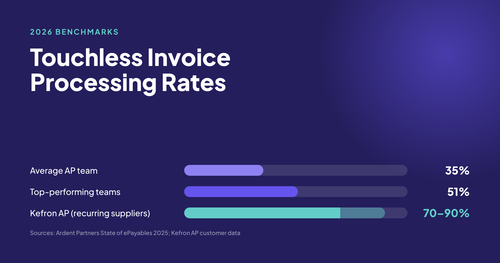
That is why Kefron AP validates data before it moves on. With clean data feeding line-level matching and rule-based invoice approvals, Kefron AP achieves 70–90% touchless processing for recurring suppliers and up to 80% less invoice processing time.
Even perfect extraction cannot fix a messy supplier master file. Duplicate supplier records, outdated bank details and inconsistent naming cause invoices to match the wrong supplier, miss duplicate checks or fail ERP validation. They are one of the most common reasons touchless rates come in below forecast.
Before any automation project, review your supplier master data for duplicates, inactive suppliers and inconsistent names. It is work you can start now, independently of any vendor decision, and it improves results whichever platform you choose. Strong ERP integration then keeps supplier data in sync between your ERP and your AP platform.
Inaccurate capture costs more than the time spent fixing it:
To put numbers on your own situation, try the invoice processing calculator or read our guide to AP automation ROI.
The most reliable accuracy figure is the one you measure on your own invoices. A simple test:
Our invoice automation buyer's guide and AP automation business case guide cover the rest of the evaluation.
Kefron AP is built for mid-market and enterprise finance teams that want high capture accuracy without dedicating internal headcount to correcting extraction errors. It integrates with 70+ ERP and finance systems, including NetSuite as a certified partner, SAP, Oracle, Microsoft Dynamics 365, Sage, Infor, Unit4 and AccountsIQ. Pricing is based on invoice volume, with no per-user charges; see AP automation pricing.
It is not the right fit if you run QuickBooks or Xero, which it does not integrate with, or if you want a self-serve tool your own team will configure and tune.

OCR accuracy depends heavily on scan quality and layout consistency. Template-based OCR works for stable, high-quality invoices from known suppliers but breaks when layouts change or scans are poor, sending errors back to the AP team.
Generally yes. AI extraction recognises fields from context rather than fixed templates, so it handles more layouts and line items. It still produces low-confidence fields on unusual invoices, which need checking.
AI extraction combined with human validation of flagged fields. The AI handles volume and the validation step catches the exceptions before data reaches your ERP. Kefron AP uses this approach to deliver 99% data accuracy after validation.
Field-level accuracy is the share of individual fields captured correctly. Invoice-level accuracy is the share of invoices with every field correct. At 98% field-level accuracy, an invoice with 20 fields is fully correct only about two times in three.
No. Structured e-invoices such as XML or PEPPOL arrive as data, so they are validated and mapped rather than read. OCR and AI extraction apply to PDF, scanned and paper invoices.
It depends on your invoice mix, since PO-backed invoices from recurring suppliers automate more readily than one-off non-PO invoices. Kefron AP achieves 70–90% touchless processing for recurring suppliers.
AI-based tools can. Kefron AP extracts header and line-item data, which supports line-level 2-way and 3-way PO matching.
Next step: see how Kefron AP invoice processing software captures, validates and posts invoices, or book a demo to test it on your own invoices.