
How Three-Way Matching Automates AP Approval (2026)
Your AP team compares purchase orders, goods receipts, and supplier invoices every day. When those...
Invoice processing is one of the most repetitive, error-prone tasks in any finance function. For mid-market and enterprise organisations handling hundreds or thousands of invoices each month, the manual approach carries a real cost: slow cycle times, duplicate payments, missed early-payment discounts, and audit trails that are difficult to reconstruct at year-end.
Invoice processing software changes the equation. It automates the journey from invoice receipt to ERP posting, replacing manual data entry and paper-chasing with structured, rule-driven workflows. But the technology only delivers its full value when it is set up correctly and used consistently.
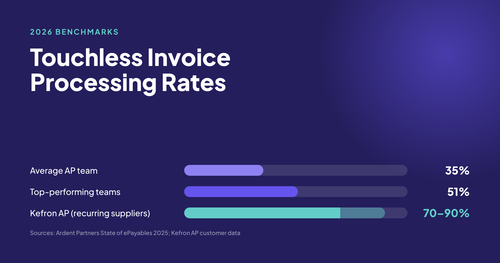
The core promise: organisations that implement invoice processing software well typically achieve touchless processing rates above 80%, meaning the vast majority of invoices move from capture to approval without any manual intervention.
This guide walks through the complete process: how invoice processing software works, how to configure it for your organisation, and the practices that separate high-performing AP teams from those still fighting the same problems after go-live.
Before configuring anything, it helps to understand what the software is handling on your behalf. Invoice processing software automates the end-to-end accounts payable workflow, covering six core functions:
|
Function |
What it automates |
|---|---|
|
Invoice capture |
Receives invoices from email, EDI, supplier portals, or scanned post and extracts structured data using OCR and AI |
|
Data validation |
Checks extracted data against supplier records, purchase orders, and business rules before it enters the workflow |
|
PO matching |
Compares invoice values against purchase orders and goods receipts (2-way or 3-way match) |
|
Approval routing |
Sends invoices to the correct approver based on rules you define: amount, department, cost centre, or exception type |
|
Exception handling |
Flags mismatches, duplicates, and missing information for human review rather than letting them pass through |
|
ERP posting |
Syncs approved invoice data directly to your ERP or accounting system, eliminating re-keying |
The critical insight is that invoice processing software does not simply speed up what your team already does. It restructures who touches an invoice and when. Standard invoices that match their PO and pass validation should move from receipt to posting with zero human intervention. People only get involved when a genuine decision is needed: a disputed amount, a new supplier, or an invoice that exceeds a defined threshold.
That shift in how work flows is what drives the efficiency gains. It is also why setup quality matters so much. If your rules are poorly configured, the software will route everything to manual review and you will have automated very little.
The first configuration task is also the most impactful: establish a single, controlled route for all incoming invoices. This sounds straightforward, but most organisations discover their invoices arrive through five or six different channels simultaneously.
Before going live, map every route by which invoices currently enter your business:
Every channel that sits outside your central intake point is a potential loss point. An invoice that arrives in a staff member's personal inbox and sits there while they are on leave is a problem no software can fix if it never enters the system.
Configure a single email address (for example, invoices@yourcompany.com) and direct all supplier correspondence there. Communicate this address to your supplier base and ask them to include a purchase order number on every invoice where one exists.
Most invoice processing platforms monitor this inbox automatically, ingesting every attachment and initiating capture without manual intervention. For paper invoices, a scanning workflow routes digitised documents into the same queue.
Key rule: one invoice, one entry point. If the same invoice can be downloaded, re-uploaded, and re-keyed across multiple systems, you have not centralised intake; you have just added another step.
Once invoices are flowing into a single point, the software takes over data extraction. Modern platforms use a combination of optical character recognition (OCR) and AI-driven field detection to read invoice documents and pull structured data from them, regardless of format or layout.
At a minimum, your capture configuration should extract the following fields from every invoice:
Extraction alone is not enough. The system should validate the captured data against your supplier master file and any linked purchase orders before the invoice progresses. This catches common issues early:
The practical benefit: catching a mismatch at the capture stage takes seconds to resolve. Catching the same error after payment has been approved takes days and often involves credit notes, supplier calls, and manual journal entries.
For high-volume AP functions, accuracy at the capture stage is the single biggest driver of touchless processing rate. If extraction confidence is low on a given invoice, the system should route it for human review rather than passing uncertain data downstream.
For organisations that use purchase orders, PO matching is the most powerful control in the invoice processing workflow. It is also where the configuration decisions have the biggest impact on how many invoices require manual intervention.
|
Match type |
What it compares |
Best suited for |
|---|---|---|
|
2-way match |
Invoice vs purchase order |
Services, where no goods receipt exists |
|
3-way match |
Invoice vs purchase order vs goods receipt |
Physical goods and inventory-based purchasing |
A 3-way match catches the most common source of invoice errors: a supplier billing for goods that have not yet been received, or billing for a quantity greater than what was delivered. For manufacturing, construction, and retail organisations in particular, 3-way matching should be the default for any PO-backed invoice.
No matching system should require a perfect match on every invoice. Small variances in shipping charges, rounding differences, or currency conversions are normal. Configure your tolerance rules to reflect this:
Not every invoice will reference a purchase order. Utilities, professional services, and recurring subscriptions often arrive without one. These need a distinct workflow: typically a coding step (assigning the correct GL account and cost centre) followed by department-level approval. Configure this path separately from your PO-matched workflow so that the two streams do not interfere with each other.
Approval routing is where most organisations either unlock the full value of their invoice processing software or undermine it. Poorly designed approval workflows are the primary reason invoices stall, deadlines are missed, and finance teams end up chasing approvers manually.
The software can only enforce rules that have been clearly defined. Before touching any configuration, document the answers to these questions:
The most efficient approval workflows route by exception, not by default. Standard invoices that pass validation and PO matching should auto-approve or require only a single low-friction confirmation. Exceptions get routed based on their specific reason:
|
Exception type |
Recommended routing |
|---|---|
|
Missing PO reference |
AP team to obtain PO before progressing |
|
Amount exceeds tolerance |
Senior approver or finance director |
|
New supplier (first invoice) |
Finance team verification plus standard approver |
|
Duplicate invoice detected |
AP team to investigate before any action |
|
High-value invoice (above defined threshold) |
Dual approval required |
The most common post-implementation complaint is that invoices pile up in individual inboxes. Three configuration choices prevent this:
Approval workflows should also be visible to the AP team in real time. A dashboard showing every invoice, its current stage, and how long it has been waiting is not a luxury; it is a basic operational requirement.
ERP integration is not a feature to evaluate after implementation. It is the foundation of the entire workflow. Without a clean, bi-directional connection between your invoice processing software and your ERP, your AP team becomes the integration layer, manually re-entering approved invoice data and reconciling discrepancies between two systems.
A well-configured integration does the following automatically:
The distinction between a pre-built API integration and a screen-scraping or file-export workaround matters enormously in practice. AP automation ERP integration is real-time, reliable, and maintainable when it is properly built. File-based integrations are brittle, delayed, and frequently break when either system is updated.
Different ERPs have different integration requirements. A few practical notes for common platforms:
Critical check: before signing any contract, ask the vendor to demonstrate a live posting from their platform to your specific ERP version. A demo to a generic test environment is not the same thing.
No invoice processing workflow is entirely touchless. Exceptions are inevitable: new suppliers, disputed amounts, missing information, or invoices that arrive in formats the system has not seen before. The question is not whether exceptions will occur, but whether your team has a clear process for resolving them quickly.
Not all exceptions are equal. Treating a missing PO number the same as a suspected duplicate creates unnecessary escalations and slows down the entire queue. Define your exception categories clearly:
Each category should have a defined owner and a target resolution time. Data quality exceptions typically sit with the AP team. Matching exceptions may require input from procurement or the budget holder. Compliance exceptions need finance or legal involvement.
One of the most underused capabilities in invoice processing software is the ability to learn from exception resolutions. When an AP team member corrects an extraction error or approves a variance, that decision should feed back into the system's rules.
Platforms that incorporate this feedback reduce exception rates over time as the AI becomes more accurate on your specific supplier formats and invoice layouts. If your vendor's platform does not offer this, the same exceptions will keep recurring at the same rate indefinitely.
A useful benchmark: if more than 20% of your invoices are being routed to manual review after six months of operation, the configuration needs revisiting. A well-tuned system should be resolving the vast majority of invoices automatically by that point.
Invoice processing software generates data that most AP teams never fully use. The reporting and analytics capabilities built into modern platforms can tell you exactly where your process is performing well and where it is breaking down. But only if you know which metrics to track.
|
Metric |
What it tells you |
Target |
|---|---|---|
|
Touchless processing rate |
Percentage of invoices processed without manual intervention |
80%+ for mature implementations |
|
Average processing time |
Days from invoice receipt to ERP posting |
Under 5 days; best-in-class is under 2 |
|
Exception rate |
Percentage of invoices routed to manual review |
Below 20% after 6 months |
|
Duplicate invoice rate |
Invoices flagged as potential duplicates |
Should trend toward zero |
|
On-time payment rate |
Invoices paid within agreed terms |
95%+ |
|
Cost per invoice |
Total AP operating cost divided by invoice volume |
Benchmark against your industry |
The touchless processing rate is the most important single number for an AP function. It is the metric that directly reflects how well the software is configured and how consistently the process is being followed. A high touchless rate means low cost, fast cycle times, and minimal manual effort. A low touchless rate means the opposite, regardless of what the software is theoretically capable of. If that number is lagging, the fastest way to improve it is often to revisit the AP implementation guide.
Review your metrics monthly in the first six months after go-live. Look for patterns in your exception queue: if the same supplier accounts for a disproportionate share of exceptions, that is a configuration problem or a supplier communication issue, both of which are solvable. If exceptions spike at month-end, that points to a resourcing or approval bottleneck that a workflow rule can address.
The Kefron AP implementation guide covers how to structure your post-go-live review cycle in more detail.
Most AP automation implementations that underperform do so for the same handful of reasons. These are not technology failures; they are process and configuration failures that the right preparation prevents.
The most effective implementations start small and practical. Centralise intake first. Then automate capture. Then add PO matching. Then tighten exception routing. Trying to configure every workflow rule, every ERP integration, and every approval path simultaneously before go-live leads to delays, scope creep, and a system that is too complex for the team to adopt confidently.
If you test your capture configuration against a set of well-formatted, high-quality PDFs from your three largest suppliers, you will see excellent extraction rates. Then go live and discover that 30% of your actual invoice volume consists of scans, forwarded emails, and multi-page documents from smaller suppliers with inconsistent formats.
Test against real supplier noise before go-live. Include the messiest invoices in your test set, not the cleanest ones.
ERP integration should be validated before approval workflows are configured, not after. If the posting logic is wrong, every invoice that passes through your beautifully designed approval workflow will fail at the last step.
Suppliers who do not know about your new invoice inbox, or who continue sending invoices to individual staff members, will create a parallel manual process that undermines the entire implementation. Communicate the change clearly, confirm receipt automatically, and follow up with any supplier still sending invoices through the wrong channel after go-live.
For a fuller view of what to look for before selecting a platform, the invoice automation buyers guide covers evaluation criteria in detail, especially where approval workflow, ERP integration, and touchless processing are concerned.
The organisations that get the most from invoice processing software share one characteristic: they treat implementation as the beginning of the process, not the end of it.
The configuration you go live with will not be the configuration that serves you best at 12 months. Approval limits change. Supplier formats evolve. Invoice volumes grow. The finance team's tolerance for manual work decreases as they experience what touchless processing feels like. Good platforms are designed to be tuned continuously, and the best AP teams schedule a formal process review at least once a year to revisit routing rules, tolerance thresholds, and exception patterns.
The underlying goal is straightforward: every invoice that can be processed without human intervention should be. Every invoice that genuinely requires a decision should reach the right person immediately, with all the context they need to act. Everything else is configuration.
If your current AP process does not reflect that goal, the question is not whether invoice processing software can help. It is which configuration changes will close the gap fastest. For teams still in selection mode, the invoice automation buyers guide is the next logical read after this one.
Ready to see how Kefron AP handles the full invoice processing workflow? Explore Kefron AP or speak to the team about your specific ERP and volume requirements.

Invoice processing software automates the flow from invoice receipt to ERP posting. It captures invoice data, validates it against supplier and PO records, routes approvals, flags exceptions, and posts approved invoices into the finance system with far less manual work.
Start by centralising invoice intake, then configure capture, PO matching, approval routing, and ERP integration in that order. The key is to define clear rules before go-live so standard invoices can move through the process without manual intervention.
A mature invoice automation setup should aim for a touchless processing rate above 80 percent. That means most invoices move from capture to approval without anyone re-keying data, chasing approvers, or fixing avoidable exceptions.
No. 3-way matching is best for goods-based purchasing where a goods receipt exists. Services and recurring spend often work better with 2-way matching, because there is no receipt to compare against. The right match type depends on the spend category.
ERP integration is what keeps invoice processing software from becoming a separate admin tool. It ensures supplier data, purchase orders, and posting results stay in sync, which reduces re-keying, lowers error risk, and preserves a clean audit trail.