AP Automation: Results from Mid-Sized & Enterprise Companies
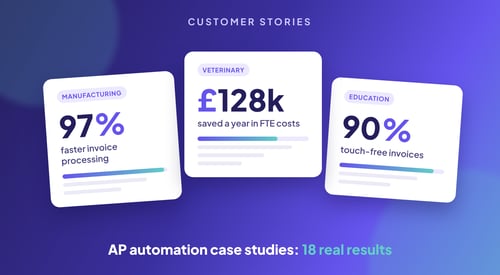
These 18 accounts payable automation case studies come from mid-sized and enterprise companies...
Enterprise Resource Planning (ERP) systems are the backbone of modern business. They join up finance, HR, supply chain and customer management. But moving to a new ERP system, or upgrading your current one, is complex. It needs careful planning and delivery. Good ERP change management is at the heart of this. It helps your organisation adapt smoothly, with less disruption and more benefit.
In this article, we look at ERP change management in detail. We cover best practices, common challenges and how invoice automation supports a successful ERP migration.
ERP change management is a structured way to move people, teams and organisations from where they are today to where they need to be during an ERP rollout or upgrade. It covers the people, process and technology sides of change, so you get the business results you want.
A new ERP system is a big change, both in technology and in culture. Even the best ERP software can fail if your people and processes aren’t ready. That is why ERP change management is so important.
Projects with excellent change management are six times more likely to meet their objectives than those without it. Change management isn’t just a support task. It is key to success.
Accelerated User Adoption
A clear approach to change helps employees understand why the new system matters. With good training, they use it with confidence, so adoption is faster across the business.
Lower Organisational Resistance
When you deal with concerns early and involve teams in the change, ERP change management reduces fear, builds trust and creates a culture of openness.
Business Continuity and Operational Stability
Change management keeps disruption to a minimum. Departments stay aligned, informed and supported throughout the migration.
Maximised Return on Investment (ROI)
When change is managed well, your ERP system delivers results faster. Processes get simpler, efficiency rises and you hit your goals on time and on budget.
In short, ERP change management turns a technical project into a business transformation. It helps people embrace change and unlocks the full value of your ERP investment.
A new ERP system isn’t just a technical upgrade. It changes how your business works. For long-term success, take a structured approach to change that puts people, processes and communication first. Here are the key best practices.
Start with a clear vision. Explain why you are implementing the ERP system, what it should achieve and how you will measure success. Linking the project to business goals, such as efficiency, compliance or digital transformation, keeps everyone focused and motivated.
Involve key stakeholders from the planning stage. They can share useful input, spot challenges early and give their support. Involving senior leaders, department heads and end users makes sure the system meets real business needs and reduces resistance.
Set up a team from across the business to manage the change. Include people from IT, HR, operations, finance and communications. They coordinate the work, support users and make sure the move is well-organised and handled with care.
Clear, regular communication is vital throughout the project. Explain what is changing, why, and how it helps users and the business. Use several channels, such as town halls, email updates, FAQs, videos and your intranet, so every team gets the message.
Tailor training to each group of users. Run hands-on sessions based on real tasks people will do in the system. After go-live, keep up the momentum with refresher sessions, support channels and easy-to-find guides.
Set clear KPIs to measure how well your change management is working. Track system use, error rates, training attendance and user feedback. Use what you learn to make changes and keep improving after go-live.
These best practices reduce friction, improve ERP adoption and maximise the return on your investment. Change becomes a chance to empower teams, modernise how you work and build a lasting advantage.
Moving to a new ERP system is one of the most complex projects an organisation can take on. It means moving data carefully, setting up new processes and coordinating across teams. Done badly, it leads to costly errors, disruption and unhappy staff. Done well, it brings efficiency, visibility and a competitive edge.
ERP system migration means moving from your current ERP to a new, often more advanced platform. You might be upgrading old software, changing vendors, moving to the cloud or combining several systems into one. The aim is better performance, room to grow and better links between teams.
ERP migrations carry risk if they aren’t planned carefully. These are the most common challenges:
Data Migration Errors
Making sure historical and transaction data is accurate, complete and compatible is one of the hardest parts of migration. Missing or corrupt data can cause knock-on problems in reporting and automation.
Operational Downtime
A badly managed switchover can interrupt services, delay work and hurt productivity. Even small delays can have a big impact if you don’t have a backup plan.
Employee Resistance
People may be reluctant to leave familiar systems, especially if the benefits haven’t been explained. Poor training and support make adoption even harder.
Budget Overruns
Without good controls and realistic forecasts, ERP projects often go over budget. This is common when data integration or customisation turns out to be more complex than expected.
To reduce risk and make your ERP migration a success, use these strategies:
Conduct a Comprehensive Readiness Assessment
Before you start, review your technical set-up, data quality, user readiness and resources. This shows you any gaps and helps set realistic expectations.
Develop a Detailed Migration Roadmap
Create a project plan with key milestones, roles, the order data will move in, testing stages and go-live plans. Include ways to manage risk and backup steps for critical stages.
Cleanse, Standardise, and Validate Data
Audit your old data. Remove duplicates, fix errors and convert formats where needed. Checking data before it goes into the new system reduces errors and integration problems later.
Implement Pilot Testing and User Acceptance Testing (UAT)
Test the system in a controlled setting using real workflows. Use feedback from early users to make changes and confirm that integrations, reports and core functions work as they should.
Offer Strong Post-Migration Support
Make sure users can get technical help, refresher training and troubleshooting guides after go-live. A dedicated support phase protects productivity and keeps users happy.
A successful migration depends on more than the software. It depends on how well you manage people, processes and data along the way. Plan for the challenges and follow a clear strategy, and your migration can become a launchpad for growth.
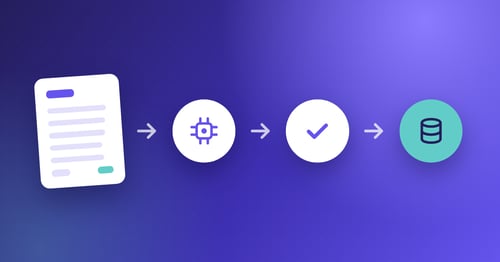
As finance teams modernise, integrating invoice automation with your ERP is now a key step in improving accounts payable. Invoice automation uses technology such as optical character recognition (OCR), artificial intelligence and workflow routing to digitise the whole invoice lifecycle. From capture and checks to approval and payment, it replaces repetitive manual tasks with fast, rules-based processes.
When connected to your ERP platform, invoice automation keeps data flowing, speeds up processing and gives you a clearer view of your finances. It supports your digital goals and improves the return on your ERP investment.
1. Increased Operational Efficiency
Automating invoice intake and approvals cuts manual data entry, removes bottlenecks and speeds up payments. It also frees your AP team for more valuable work, like managing suppliers and analysing cash flow.
2. Improved Accuracy and Reduced Errors
Manual invoice entry leads to typos, duplicates and mismatches. Automation applies validation rules and smart matching (such as two-way or three-way PO matching), so there are fewer exceptions and reconciliation is smoother.
3. Cost Reduction and Paperless Processing
Invoice automation cuts the costs of handling, storing and printing paper, and of manual work. Studies have shown that companies can save up to 80% on processing costs by going fully digital.
4. Real-Time Financial Visibility
Integrated invoice automation gives you live insight into accounts payable, liabilities, payment status and cash flow forecasts. You can see it all in your ERP dashboard, which improves financial control and decision-making.
Before you roll out invoice automation with your ERP, check these key points to make sure it goes smoothly and lasts:
System Compatibility
Make sure the solution supports your ERP, whether that is SAP, Oracle, Microsoft Dynamics, NetSuite or another system. Smooth integration keeps data and reports accurate.
Process Alignment and Customisation
Set up workflows to match your approval hierarchy, invoice types and supplier categories. Avoid a one-size-fits-all set-up, because different departments may need different routing rules.
User Training and Change Readiness
Give your finance team full training. Offer hands-on sessions, quick guides and ongoing support after launch, so they can use the system confidently from day one.
Vendor Support and Scalability
Choose a provider with reliable support, regular updates and the ability to grow with you. A strong vendor relationship lowers risk and keeps your system working well for longer.
Integrating invoice automation with your ERP isn’t just a quick fix. It is a strategic change that makes your finance team more agile, cuts friction and prepares you to grow. Running AP within your ERP gives you more control over spend, stronger supplier relationships and a faster route to digital maturity.
ERP change management is key to a successful ERP migration. Follow best practice, tackle common challenges and use tools like invoice automation, and you can work more efficiently, cut costs and meet your goals. A proactive, structured approach to change makes the move to a new ERP smooth and worthwhile for everyone.