AP Automation: Results from Mid-Sized & Enterprise Companies
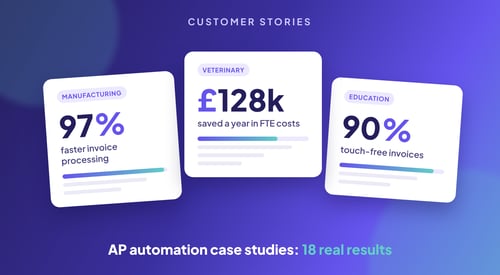
These 18 accounts payable automation case studies come from mid-sized and enterprise companies...
The short answer: the best AP automation for NetSuite captures every invoice accurately, matches it to NetSuite purchase orders and receipts at line level, routes approvals without SuiteFlow scripting, and syncs everything back to NetSuite through a direct API. Kefron AP does all of that and adds a human validation layer that takes data accuracy to 99%+, which is why it sits at the top of this list for mid-market and enterprise finance teams in the UK, Ireland and the US.
NetSuite runs your core financials well. Accounts payable is where most teams still lose hours: keying invoices, chasing approvals by email and checking POs line by line before anything can be paid. This guide covers where NetSuite's native AP stops, what to look for in an add-on, and how the leading NetSuite AP automation tools compare in 2026.
NetSuite AP automation is software that connects to NetSuite and takes over the manual parts of the payables process: capturing invoice data, coding it, matching it to purchase orders and goods receipts, routing it for approval and posting a clean vendor bill into NetSuite. The goal is touchless processing, where an invoice goes from inbox to approved bill without anyone on your team touching it.
NetSuite includes vendor bills, SuiteApprovals and Bill Capture for basic invoice data extraction. For low volumes, that can be enough. As invoice volume, entities and approval rules grow, the gaps show up quickly:
An AP automation layer fixes these without replacing anything in NetSuite. Your ERP stays the system of record.
NetSuite AP automation tools connect in one of three ways:
Running inside NetSuite sounds safest, but where a tool lives matters less than whether the data reaching NetSuite is right. A SuiteApp still depends on OCR and AI reading every invoice correctly, and on your team fixing what it misses. A connected platform with a direct API can sync just as fast and add things a SuiteApp usually does not, such as a human validation layer, approval routing that finance can change without NetSuite admin access, and AP reporting outside NetSuite's saved searches.
The better question for any vendor is: how many of our invoices will reach NetSuite as a correct, approved bill without anyone touching them?
Use these criteria when you shortlist vendors. They are also the questions to put to every vendor in a demo.
Ask every vendor one question first: what percentage of invoices like yours go from receipt to approved bill with no human touch? This is the single number that tells you how much work actually leaves your AP team. A tool with clever features and a low touchless rate still leaves you doing the work.
Every downstream step depends on the data being right. Ask whether accuracy figures are before or after validation, and who does the validation. AI-only capture shifts error-checking back onto your team.
Header-level matching tells you the total is right. Line-level matching tells you each item, price and quantity is right against the NetSuite PO and item receipt. That is what lets clean invoices pass straight through.
Your finance team should be able to change routing rules by entity, department, vendor or value without raising a ticket for a NetSuite developer.
Check exactly what syncs and how often. A strong NetSuite integration keeps vendors, GL accounts, departments, classes, locations, tax codes, custom segments, POs and item receipts in sync, and posts bills back in real time.
If you run several subsidiaries in NetSuite, the tool should handle entity-specific coding, approvals and tax rules from one AP workflow, without separate processes per entity.
Ask for a realistic go-live date and what your team needs to do to get there. Long implementations delay payback and drain finance time.
Kefron AP is a certified NetSuite partner with a direct API integration. Invoices, purchase orders, item receipts, supplier records, GL codes, tax codes, custom fields and custom segments sync between Kefron AP and NetSuite in real time, with no middleware.
What sets Kefron AP apart is how it gets data right. AI captures every invoice, header and line items, and a dedicated Data Assurance Team validates flagged fields before anything reaches NetSuite. The result is 99%+ data accuracy after validation, so your team stops correcting bills after they post.
That accuracy is what drives a high touchless processing rate. Line-level 2-way and 3-way PO matching is included as standard, so invoices that match NetSuite POs and receipts flow straight to approval, and only genuine exceptions reach your team.
Key features
Results on NetSuite
Best for: mid-market and enterprise NetSuite users in the UK, Ireland and the US who want the highest touchless rate and clean data in NetSuite from day one.
ZoneCapture is a NetSuite SuiteApp, so invoice capture, OCR and coding happen inside NetSuite with no separate login. Approval workflows come through a separate Zone & Co app, ZoneApprovals.
Watch for: it is focused on capture and coding, so check that approvals, matching and payments are covered for your workflow. Accuracy depends on OCR and AI plus your team's corrections, with no dedicated validation layer before bills are created.
Best for: teams that want to keep every AP step inside the NetSuite interface.
Stampli gives AP teams an invoice-centred workspace where coding, approval and communication happen on the invoice itself. It holds Built for NetSuite status and syncs subsidiaries, lists and custom fields. Its AI assistant suggests GL coding based on past behaviour.
Watch for: capture relies on AI plus your team's corrections rather than a dedicated validation team, and invoice documents live in Stampli, so users move between two systems.
Best for: teams that want collaborative approvals around each invoice.
Tipalti is strongest on global payables: supplier onboarding, tax form collection and payments in 120+ currencies across 190+ countries, with payment data posted back to NetSuite.
Watch for: it is a payments-first platform. If your main problem is invoice capture accuracy and matching rather than paying international suppliers, you may be paying for capability you do not need.
Best for: NetSuite users with large international supplier bases and complex global payment runs.
NetSuite's own payment automation, powered by BILL, is embedded in NetSuite and handles supplier payments without leaving the ERP.
Watch for: it is built around paying bills rather than capturing and checking them. Teams with high invoice volumes, line-level matching or complex approvals usually need deeper AP controls.
Best for: smaller NetSuite teams with straightforward bill-pay needs.
Medius offers AP automation as part of a wider spend management suite, with AI-based coding, approval workflows and spend analytics, connected to NetSuite through a cloud connector.
Watch for: the broader procure-to-pay scope means more configuration if you only need AP, and there is no dedicated human validation layer before data reaches NetSuite.
Best for: larger organisations that want procurement and AP in one suite.
Centime runs as a native NetSuite SuiteApp, combining invoice capture and AI coding with ACH, card and check payments and cash flow tools.
Watch for: AI coding accuracy depends on how much history you have in NetSuite, and the cash management features may go unused if you only need AP.
Best for: US-based NetSuite users who want AP and payments in one SuiteApp.
| Tool | Invoice capture | PO matching | NetSuite connection | Best for |
|---|---|---|---|---|
| Kefron AP | AI + human validation (99%+ accuracy) | Line-level 2-way and 3-way, included | Direct API, certified NetSuite partner | Highest touchless rate, clean NetSuite data |
| Zone & Co (ZoneCapture) | OCR/AI inside NetSuite | Check per workflow | Native SuiteApp | Staying fully inside NetSuite |
| Stampli | AI with user corrections | 2-way and 3-way | Built for NetSuite | Collaborative invoice approvals |
| Tipalti | OCR/AI | 2-way and 3-way | NetSuite integration | Global supplier payments |
| NetSuite payments (BILL) | Basic | Basic | Embedded in NetSuite | Simple bill-pay |
| Medius | AI capture and coding | 2-way and 3-way | Cloud connector | Procure-to-pay suites |
| Centime | OCR + AI coding | 2-way and 3-way | Native SuiteApp | US AP plus payments |
| NetSuite native | Bill Capture | Basic, more manual exceptions | Built in | Low invoice volumes |
UK and Irish NetSuite users have a few extra requirements to check:
Kefron AP is headquartered in Ireland and supports NetSuite customers across the UK, Ireland and the US. Read more in our guide to AP automation for the UK and Ireland.
For more detail on the questions to ask, see key questions on AP automation for NetSuite and SAP and our comparison of the best NetSuite integrations for AP teams.
If your team is still keying invoices into NetSuite or chasing approvals by email, book a demo and we will show you your own invoices going from inbox to approved NetSuite bill.

Kefron AP is the best AP automation for NetSuite for mid-market and enterprise teams. It combines AI capture with human validation for 99%+ accuracy, includes line-level 2-way and 3-way PO matching, and syncs with NetSuite in real time through a direct API as a certified NetSuite partner.
Yes, but it is basic. NetSuite offers vendor bills, SuiteApprovals and Bill Capture. Line-level matching, flexible approval routing and exception handling usually need customisation or a dedicated AP automation tool.
Not necessarily. A SuiteApp keeps users inside NetSuite, but a direct API integration can sync in real time too. What matters more is how accurate the data is when it reaches NetSuite and how many invoices go through untouched. Kefron AP uses a direct API integration with human-validated data capture for 99%+ accuracy.
NetSuite can match bills to purchase orders and item receipts, but automated line-level 3-way matching with tolerances and exception flags typically needs an add-on. Kefron AP includes line-level 2-way and 3-way matching as standard.
Most tools connect through the NetSuite API or a SuiteApp. Kefron AP uses a direct API integration that syncs suppliers, POs, item receipts, GL codes, tax codes, custom fields and custom segments, and posts approved bills back to NetSuite in real time.
It varies by vendor and complexity. Kefron AP customers go live in as little as five weeks.
It depends on your invoice mix and how many invoices are PO-backed. The key is to ask every vendor for their rate on invoices like yours and to measure it after go-live. Read how AP automation works across the invoice cycle for benchmarks.
Yes, if the tool supports entity-specific coding, approvals and tax rules. Kefron AP supports multi-entity teams with consistent coding across entities from one AP workflow.