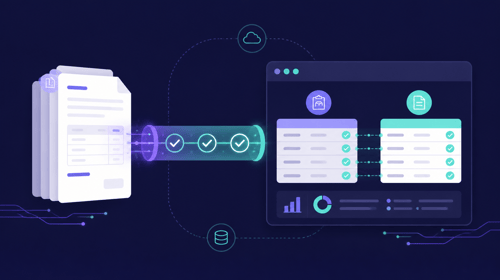
If your AP team runs on NetSuite, you already know the ERP handles core financials well. But invoice capture, PO matching, and approval routing? Those areas still leave your team doing more manual work than necessary. The right NetSuite integrations for AP can close those gaps and give your finance team hours back every week.
Kefron AP automates invoice processing for NetSuite users with AI-powered data capture, line-level PO matching, and real-time ERP sync. In this article, you'll find six integrations built specifically for accounts payable workflows on NetSuite, with a clear breakdown of what each one does and where it fits.
Quick guide: 6 best NetSuite integrations for AP teams
- Kefron AP: The best AP automation integration for NetSuite with AI extraction and managed data accuracy
- Stampli: Invoice-centric AP workspace with Built for NetSuite certification
- Centime: AP automation paired with cash management and payment tools
- MineralTree: End-to-end invoice-to-payment automation with two-way NetSuite sync
- Tipalti: Global payables and mass payment processing for multi-subsidiary setups
- Medius: Spend management with AP automation and supplier analytics
How we chose the best NetSuite integrations for AP
We looked at dozens of AP tools that connect to NetSuite and narrowed the list based on what matters most to mid-market finance teams like yours. Here's what we checked for:
- Native NetSuite connectivity: Does the tool sync directly with your NetSuite environment through an API or certified bundle, so your data stays consistent without manual exports?
- Invoice capture accuracy: Can it extract data from different invoice formats with high accuracy, reducing the amount of manual correction your team needs to do?
- PO and receipt matching: Does it handle 2-way and 3-way matching at the line level, catching discrepancies before they become payment errors?
- Approval workflow flexibility: Can you configure routing rules based on vendor, department, or invoice value, and adjust them without IT involvement?
- Multi-entity support: If you run multiple subsidiaries in NetSuite, does the tool handle cross-entity invoicing and consolidated reporting?
- Implementation and support: How quickly can you go live, and what ongoing support is available after launch?
The 6 best NetSuite integrations for AP teams
1. Kefron AP: Best overall NetSuite integration for AP teams
Kefron AP connects directly to NetSuite through a certified API integration, syncing invoices, purchase orders, GL codes, supplier lists, and custom fields in real time. Your AP team gets automated invoice processing from the moment an invoice arrives by email or upload, all the way through to ERP posting.
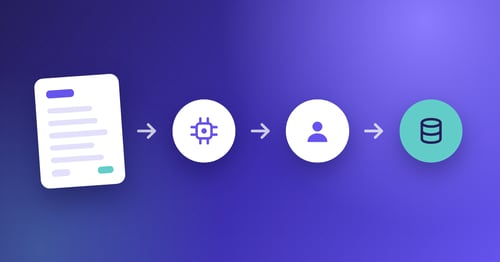
What sets Kefron AP apart is its Data Assurance Team. AI handles the extraction, and then a dedicated team of specialists reviews flagged fields to deliver 99%+ data accuracy. You're not left fixing errors after the fact or relying on automation alone.
Kefron AP gives you line-level PO matching that catches discrepancies before they reach approvers. Finance teams using Kefron AP on NetSuite have reported an 84% reduction in invoice processing time, according to a published case study with fintech company Freetrade.
As a certified NetSuite partner, Kefron AP supports multi-entity environments, custom segments, and tax codes. Implementation takes as little as five weeks with guided onboarding, and your team gets a dedicated Customer Success Manager throughout.
Kefron AP features
- AI-powered data extraction with human validation: Every invoice is captured using machine learning, then reviewed by a Data Assurance Team, giving you 99%+ accuracy without manual re-keying
- Line-level 2-way and 3-way PO matching: Invoices are matched against purchase orders and goods receipt notes at the line item level, so price and quantity mismatches are flagged automatically
- Configurable approval workflows: Route invoices based on vendor, department, value, or entity, and adjust rules without scripts or IT tickets
- Real-time dashboards and reporting: Monitor processing speed, bottlenecks, and SLA performance with dynamic analytics built for AP managers and controllers
- Automated GL coding: AI learns from your transaction history to apply cost codes and GL allocations consistently, with ERP-ready output synced straight to NetSuite. See automated NetSuite invoice coding in action
Kefron AP pros and cons
Pros:
- Built for NetSuite verified, with automatic bundle updates that keep the integration current after Oracle's semi-annual releases
- Kefron AP delivers99%+ data accuracy thanks to its unique combination of AI extraction and a dedicated human review team
- Certified NetSuite partner with direct API integration that syncs invoices, POs, and GL codes in real time
- Fast implementation in as little as five weeks, with a dedicated Customer Success Manager assigned from day one
Cons:
- Advanced features like the PO module and supplier portal may require additional configuration during setup
- Some reporting templates are optimised for UK and European compliance standards, which may need adjustments for US-only teams
2. Stampli: Invoice-centric workspace for NetSuite AP workflows
Stampli has Built for NetSuite verification and offers a dedicated AP workspace where your team can code, approve, and post invoices. The platform syncs subsidiary, list, and custom field data with NetSuite using token-based authentication.
Stampli includes an AI assistant called Billy the Bot that learns GL coding patterns from your team's history. The tool also supports intercompany transactions and SuiteTax compatibility for organisations migrating from Legacy Tax.
Stampli features
- AI-assisted GL coding: Billy the Bot learns from your team's coding history and suggests GL codes, departments, and custom fields during invoice review
- Dynamic approval routing: Add approvers on the fly and run Stampli workflows alongside native NetSuite approval rules when needed
- SuiteTax and Legacy Tax support: Handles both tax engines, so your AP process is not disrupted during a SuiteTax migration
Stampli pros and cons
Pros:
- Supports many-to-many filtering so coders only see valid combinations of subsidiaries, GLs, and custom fields
- Includes vendor pre-payment management and credit memo application inside the AP workflow
Cons:
- Does not include a Data Assurance Team for human-reviewed invoice validation, so accuracy depends on AI and user corrections
- Invoice PDFs are stored in Stampli rather than NetSuite, requiring users to navigate between two systems for document retrieval
- Implementation scope may increase for multi-subsidiary environments with complex custom field mappings
3. Centime: AP automation combined with cash management for NetSuite
Centime runs as a native NetSuite SuiteApp that captures invoices, codes them using AI, and matches them against purchase orders and receipts. The platform also includes integrated payment functionality for ACH, virtual card, and check payments, all synced bidirectionally with NetSuite.
Centime syncs 73 record types with NetSuite, including custom forms, segments, and multi-subsidiary journal entries. According to the Ardent Partners State of ePayables 2025 report, organisations that automate AP alongside cash management tend to see faster ROI through tighter control of payment timing and working capital.
Centime features
- OCR capture with AI-predicted coding: Reads invoice headers and line items, then predicts GL codes based on your NetSuite chart of accounts
- Integrated ACH and virtual card payments: Approve and pay from one screen, with payment data posting back to NetSuite automatically
- Two-way and three-way PO matching: Compares invoices to NetSuite purchase orders and receipts, surfacing only the exceptions that need review
Centime pros and cons
Pros:
- Combines AP automation with payment execution and cash flow monitoring in a single platform
- Native NetSuite SuiteApp that syncs bidirectionally, including custom fields, segments, and multi-entity records
- Virtual card rebates can offset a portion of the subscription cost over time
Cons:
- AI coding accuracy depends on volume of historical data in your NetSuite instance, so newer accounts may require more manual corrections initially
- The cash management features may go unused if your team only needs invoice capture and matching
- Does not offer a dedicated human review layer for invoice data validation before ERP posting
4. MineralTree: End-to-end invoice-to-payment processing for NetSuite
MineralTree TotalAP connects to NetSuite with a two-way API integration that keeps bills and payments synchronised in both directions. The platform automates invoice capture, approval routing, and payment execution, including ACH and check disbursements.
MineralTree offers multi-entity configuration options, letting you manage the integration at the account, subsidiary, or mixed environment level. One case study from Simple Mills notes a 50% increase in invoice volume handled without additional AP headcount.
MineralTree features
- Two-way NetSuite sync: Bills and payments updated in NetSuite reflect in MineralTree automatically, and vice versa
- Simplified reconciliation: Reconcile a single debit per payment run instead of individual payments across multiple bank statements
- Multi-entity support: Configure the integration at account level, subsidiary level, or across a mixed multi-entity environment
MineralTree pros and cons
Pros:
- Two-way sync between NetSuite and MineralTree keeps both systems in alignment without manual intervention
- Consolidated payment runs simplify bank reconciliation for finance teams processing high volumes
- Supports multiple configuration options for managing complex NetSuite subsidiary structures
Cons:
- Does not include line-level AI-powered PO matching, which limits automation for invoice-to-receipt validation
- Invoice capture relies primarily on OCR without a dedicated human review step for data accuracy
- The platform does not include a supplier-facing portal for vendors to check invoice or payment status
5. Tipalti: Global payables processing for multi-subsidiary NetSuite environments
Tipalti connects to NetSuite and focuses on mass payment processing across multiple countries. The platform supports payments in over 120 currencies and 190 countries, making it relevant for organisations with a large international vendor base.
Tipalti automates vendor onboarding, tax form collection (W-8/W-9), and payment reconciliation. Payment data syncs back to NetSuite's general ledger automatically, keeping your AP records current across subsidiaries.
Tipalti features
- Global mass payments: Pays suppliers in 120+ currencies across 190+ countries using ACH, wire, PayPal, and local payment methods
- Automated tax compliance: Collects and validates W-8, W-9, and other tax forms during vendor onboarding
- Multi-subsidiary GL sync: Posts payment data back to NetSuite across multiple entities, keeping ledgers aligned after each payment run
Tipalti pros and cons
Pros:
- Covers 190+ countries and 120+ currencies, giving multi-national organisations a single payment rail for global suppliers
- Automates vendor onboarding and tax form collection, reducing manual compliance work for your AP team
- Handles large-scale payment batches, making it relevant for organisations processing thousands of vendor payments per cycle
Cons:
- Invoice capture and OCR capabilities are more limited compared to AP-first platforms, so you may still need manual entry for some invoice types
- The platform is primarily focused on payment execution rather than full-cycle AP workflow automation
- NetSuite integration configuration requires mapping across subsidiaries, which adds complexity to the initial setup
6. Medius: Spend management with AP automation for NetSuite
Medius offers AP automation as part of a broader spend management suite that includes procurement and supplier analytics. The NetSuite connector syncs invoice data, PO information, and vendor records using a cloud-based integration.
Medius includes AI-based invoice coding and approval workflows, plus analytics dashboards that track spending patterns across your organisation. The platform focuses on giving finance teams visibility into the full procure-to-pay cycle.
Medius features
- AI-based invoice coding: Predicts GL codes and cost allocations based on historical patterns from your NetSuite data
- Spend analytics: Dashboards that track spending by vendor, department, and category across the procure-to-pay cycle
- Cloud-based NetSuite connector: Syncs vendor records, invoices, and PO data between Medius and NetSuite
Medius pros and cons
Pros:
- Combines AP automation with procurement and supplier analytics in a single platform
- Spend visibility dashboards help finance leaders identify patterns across vendors and departments
- Includes workflow automation that routes invoices based on configurable business rules
Cons:
- The broader spend management scope means AP-specific features may require more configuration to match a pure AP automation tool
- NetSuite integration uses a cloud connector rather than a native SuiteApp, which may affect sync speed for high-volume environments
- Does not include a dedicated human validation layer for invoice data quality before posting to the ERP
Comparison table: The best NetSuite integrations for AP
| Integration |
Human Data Review |
Line-Level PO Matching |
| Kefron AP |
✓ |
✓ |
| Stampli |
✗ |
✓ |
| Centime |
✗ |
✓ |
| MineralTree |
✗ |
✗ |
| Tipalti |
✗ |
✗ |
| Medius |
✗ |
✗ |
What should AP teams look for in a NetSuite integration?
The most important factor is how well the integration keeps your NetSuite data in sync. A direct API connection that syncs invoices, POs, GL codes, and vendor records in real time means your team spends less time reconciling between systems.
Accuracy matters just as much. If your AP tool relies solely on OCR or AI for data capture, errors can slip through and create downstream issues in NetSuite. Look for tools that combine AI with a human review step, so your ERP data stays clean from the start.
You'll also want to consider how the tool handles multi-entity environments. If you run multiple subsidiaries in NetSuite, the integration should support cross-entity syncing of custom segments, tax codes, and intercompany transactions without manual workarounds.
How does AP automation reduce invoice processing time on NetSuite?
Manual invoice processing on NetSuite typically involves keying in header and line-item data, cross-referencing POs, and routing approvals by email or internal note. Each of these steps adds time and introduces the risk of errors.
AP automation removes the repetitive data entry by extracting invoice information automatically and matching it against your existing POs and receipts. Kefron AP reduces invoice processing time by up to 80% for NetSuite users, according to results reported by customers like 200 Degrees Coffee, who cut their AP cycle from three days to roughly one hour.
The biggest time savings come from automated line-level matching and configurable approval workflows. When invoices are matched, coded, and routed without manual intervention, your team can focus on clearing only the exceptions that genuinely need attention.
Why Kefron AP is the best NetSuite integration for AP teams
Most AP integrations for NetSuite stop at OCR and basic workflow routing. Kefron AP goes further by combining AI-powered data capture with a dedicated Data Assurance Team that reviews flagged fields before anything posts to your ERP. That combination delivers 99%+ accuracy, which is difficult to match with automation alone.
Kefron AP is a certified NetSuite partner, and the direct API integration syncs invoices, POs, GL codes, supplier lists, custom fields, and tax codes in real time. For mid-market finance teams running multiple entities on NetSuite, that level of detail matters. It keeps your ledger clean and your month-end close on track.
If your AP team is ready to stop spending days on manual data entry and start processing invoices in hours, book a demo with Kefron AP to see the NetSuite integration in action.

FAQs about NetSuite integrations for AP teams
What is the best NetSuite integration for accounts payable?
Kefron AP is the best NetSuite integration for AP because it combines AI-powered invoice capture with human-reviewed data accuracy at 99%+. The certified API integration syncs invoices, POs, and GL codes in real time, keeping your NetSuite data clean.
Does NetSuite have built-in AP automation?
NetSuite includes basic AP features like bill entry and approval routing, but invoice capture, PO matching, and exception handling still require manual effort. Many finance teams add a dedicated AP automation tool like Kefron AP to fill those gaps.
How long does it take to integrate AP automation with NetSuite?
Kefron AP's ERP integration goes live in as little as five weeks with guided onboarding. Other tools vary, but most certified NetSuite integrations can be configured in four to eight weeks depending on complexity.
Can AP automation handle multi-entity NetSuite environments?
Yes. Kefron AP supports multi-entity syncing of custom segments, tax codes, GL codes, and intercompany transactions. This keeps your AP data consistent across all subsidiaries without manual reconciliation.
What is 3-way matching in NetSuite AP automation?
3-way matching compares invoices against purchase orders and goods receipts to confirm that what you ordered, received, and were billed for all align. Kefron AP automates this at the line level, flagging only exceptions that need your attention.