10 Accounts Payable Metrics Finance Leaders Should Watch (2026)
Your accounts payable department generates a lot of data. The challenge is knowing which numbers...
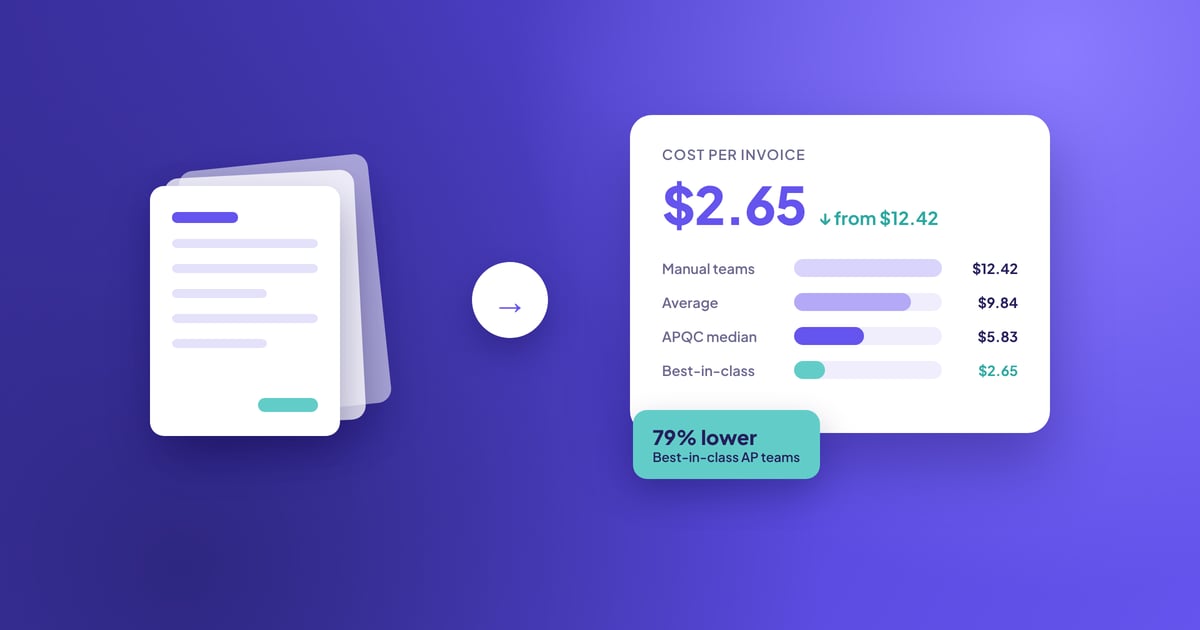
Most AP teams know their cost per invoice is too high. Fewer know exactly where that cost comes from. Invoice processing cost isn't one expense. It's labour, exceptions, approval delays, matching and filing stacked on top of each other, invoice after invoice.
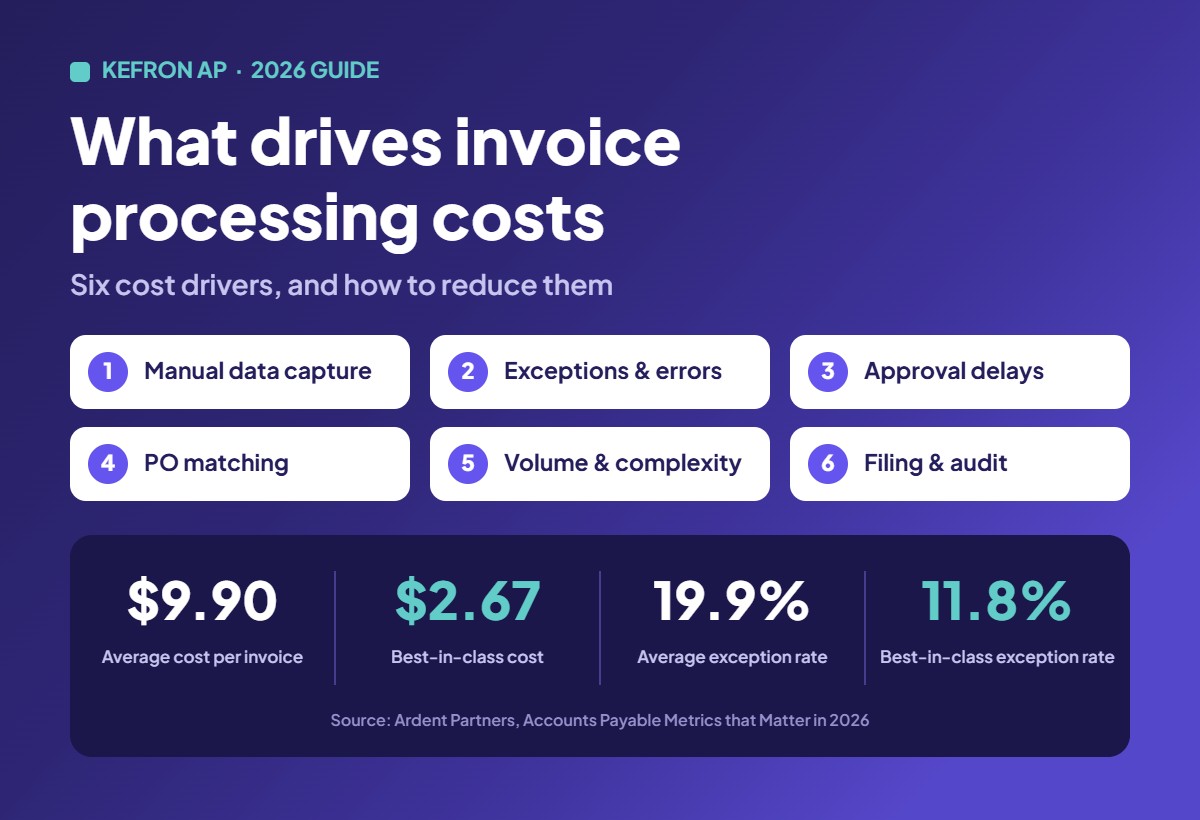
The gap between average and top-performing teams is wide. Ardent Partners' Accounts Payable Metrics that Matter in 2026 puts the average cost at $9.90 per invoice and best-in-class teams at $2.67. APQC's cross-industry median, from 5,846 organisations, is $6.00. For the full benchmark breakdown, see our complete guide to cost per invoice.
This article looks at what sits behind that number: the six cost drivers, what a good exception rate and cycle time look like, and how finance teams reduce invoice processing costs in practice.
Six things decide what each invoice costs you. They're listed roughly in order of how much they usually cost, but the order changes from team to team, so measure your own.
Reading an invoice, keying header and line-item details into the ERP and checking what was typed is usually the largest share of processing cost. Industry estimates put manual touch time at around 10 to 15 minutes per invoice. Volume makes it worse: when invoices go up, a manual team either hires or falls behind.
It's also the root of other costs. A mistyped PO number or amount doesn't stay a data entry problem. It turns into an exception, a supplier query or a duplicate payment later. Automated invoice capture removes this step for most invoices.
An exception is any invoice that can't go straight through: a PO mismatch, a missing field, a duplicate, wrong supplier details or a price that doesn't agree. Each one pulls someone off routine work to investigate, contact the supplier or chase the buyer.
Exceptions are expensive because they're slow and unpredictable. A clean invoice might take minutes; an exception can take days of back and forth. That's why exception rate is one of the best predictors of cost per invoice.
In manual teams, approvals run on email chains, printed invoices and reminders. Invoices sit in inboxes, approvers are on leave, and nobody can see where anything is. The staff time is only part of the cost. Slow approvals mean missed early payment discounts and late payment penalties.
Here's what that can look like. On $10 million of annual payables with 2/10 net 30 terms, taking every discount is worth $200,000 a year. If slow approvals mean you only capture 30% of them, you're leaving $140,000 on the table. Automated invoice approvals route each invoice to the right person and chase them for you.
Checking each invoice against the purchase order and goods receipt before it can be paid is detailed work when it's done by hand. Price differences, short deliveries and missing receipts all create more exceptions. Automated 2-way and 3-way matching clears invoices that match and only flags the ones that don't.
More invoices don't automatically mean a higher cost per invoice. Fixed costs like systems and management get spread across more transactions. The problem is volume growing while the process stays manual.
Complexity is a separate driver. Multi-line invoices, foreign currency, partial deliveries and progress billing all take longer. Construction invoices are a good example: matching against milestones, change orders and retentions takes far longer than a simple utility bill. Line-level matching handles that detail automatically, and for suppliers who can send them, structured e-invoices remove the capture step altogether.
Storing invoices, finding them again for audits, VAT checks and supplier disputes, and pulling supporting documents is a smaller cost, but a constant one. When invoices live across inboxes, shared drives and filing cabinets, every audit request turns into a search. A central document centre makes every invoice searchable in seconds.
Ardent Partners' 2026 research puts the average invoice exception rate at 19.9%, meaning roughly one invoice in five needs manual intervention. Best-in-class teams run at 11.8%. A good target is anything below 12%.
The most common causes of exceptions are:
To reduce your exception rate, start with data accuracy. Many exceptions are created inside AP rather than by suppliers, so validated data capture at the start of the process removes a large share of them. After that, tighten PO compliance with buyers and set sensible matching tolerances so small rounding differences don't stop an invoice. Automated supplier statement reconciliation also catches missing invoices and credit notes before they turn into supplier disputes.
Invoice cycle time is the number of days from receiving an invoice to it being approved and ready to pay. Ardent Partners' 2025 benchmarks put the average at 9.2 days, with best-in-class teams at 3.1 days.
Cycle time and cost move together. The longer an invoice sits, the more often someone touches it: chasing approvals, answering "when will I be paid?" emails, rechecking details. A good target for most mid-market teams is under five days, with straightforward PO-backed invoices cleared in one or two.
Divide your total AP cost for a period by the number of invoices processed in the same period. Include salaries, benefits and overheads for everyone who touches invoices, plus software, scanning and outsourced costs.
For example, a two-person AP team costing $55,000 each, fully loaded, costs about $9,167 a month. At 800 invoices a month, that's $11.46 per invoice, above the $9.90 industry average. Use the invoice processing cost calculator to work out your own figure in GBP, EUR or USD.
Tackle the drivers in order of impact. Adding headcount only absorbs the cost; it doesn't reduce it.
Together, these steps move invoices from capture to ERP posting without anyone touching them. Kefron AP processes 70 to 90% of invoices from recurring suppliers touchless, and customers have cut invoice processing time by 92% and approval time by 67%. See results from 18 AP automation case studies.
You pay per invoice processed, with no per-user fees. See how Kefron AP is priced, or compare the common AP automation pricing models.
Your cost per invoice isn't fixed. It's the result of how you capture data, handle exceptions, route approvals and store documents. Each of those can be measured and improved on its own. The teams processing invoices for $2.67 face the same drivers you do. They've just tackled the biggest ones first.
Want to know what your current process is costing you? Calculate your cost per invoice, then get a Kefron AP quote within 24 hours.
Six things: manual data capture, exceptions and error correction, approval delays, PO matching, invoice volume and complexity, and filing and retrieval. Manual data capture is usually the biggest, and it causes many of the exceptions that follow.
Below 12%. Ardent Partners' 2026 research puts the average at 19.9% and best-in-class teams at 11.8%. Most exceptions come from price or quantity mismatches, missing PO numbers, duplicates and data entry errors.
The average invoice cycle time is 9.2 days from receipt to approval, while best-in-class teams take 3.1 days (Ardent Partners, 2025). With automated capture, matching and approvals, straightforward PO-backed invoices can be cleared in a day or two.
Because every step needs a person: keying data, matching to POs, chasing approvals, fixing errors and filing. Each step adds time, and errors early on create exceptions later. Manual teams also miss early payment discounts because approvals take too long.
Start by automating data capture, because it's the largest cost and the source of many exceptions. Then reduce exceptions, automate approvals and matching, and centralise your documents. Track cost per invoice, exception rate and cycle time monthly to see what's working.