AI In Finance: What Finance Leaders Are Telling Us
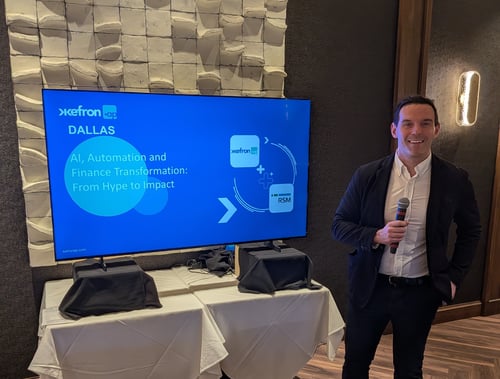
Last week we hosted AI, Automation and Finance Transformation: From Hype to Impact in Dallas with...
Accounts payable automation software captures, matches, codes and routes supplier invoices without manual keying. The seven features that matter most for mid-market finance teams are data capture accuracy, PO matching, non-PO invoice handling, ERP integration depth, automated GL coding, approval workflow flexibility, and reporting with a full audit trail.
Feature lists all look similar at the demo stage. What separates platforms is how each capability behaves against your own invoices, your own ERP and your own approval rules once the pilot ends. This article covers the seven features worth testing properly, and what to ask about each one.
Accounts payable automation software is a system that receives supplier invoices, extracts the data from them, validates that data against purchase orders and goods receipts, routes invoices for approval, and posts clean, coded records into your finance system. It replaces manual keying, paper approval chains and spreadsheet tracking with a single controlled workflow. Kefron AP is one example of this category.
Two distinctions are worth making early, because vendor marketing tends to blur them.
The practical test is what lands in your finance system at the end. If a person still has to open the invoice and type something, the process is digitised rather than automated.
Evaluate on behaviour under real conditions, not on feature presence. Almost every platform on a shortlist will tick every box on a requirements matrix. The differences appear when you run your messiest invoices through it, map your genuine approval exceptions, and ask precisely how data moves between the platform and your ERP.
The seven features below are ordered by how often they cause problems after go-live rather than by how prominently they feature in demos.
Capture accuracy determines how much manual work survives automation. A platform extracting 85% of fields correctly still leaves your team checking every invoice, which removes most of the benefit.
Accuracy figures in marketing material typically come from clean test sets. Your invoices arrive as photographs of creased paper, PDFs generated by twenty different systems, and formats that have drifted over years of supplier relationships. Ask how the platform handles a supplier changing its invoice layout without warning: template-based systems need reconfiguring, machine learning systems adapt.
Ask also what happens to fields the system is unsure about. Some platforms flag them for your team. Kefron AP applies a different model, combining machine learning invoice data capture with a data assurance team that reviews uncertain fields in real time, which is how it holds 99%+ accuracy on header and line-item data without pushing exception handling back to the customer.
What to test: run 200 of your worst invoices through the pilot and measure field-level accuracy yourself.
Two-way matching compares the invoice against the purchase order. Three-way matching adds the goods receipt note, confirming that what was ordered was also delivered before payment is approved.
The detail that matters is the level at which matching happens. Header-level matching compares invoice totals against PO totals, which passes an invoice where individual lines are wrong but the total happens to reconcile. Line-item matching compares each line, catching quantity and price discrepancies that header matching misses entirely. We covered the mechanics in detail in manual versus automated PO matching.
Ask what tolerance rules are available, how discrepancies are surfaced, and who resolves them. Exception handling is where AP teams lose the time automation was supposed to give back.
Non-PO invoices are the ones most demos skip, and the ones where manual effort concentrates. Utilities, professional fees, subscriptions and ad hoc purchases arrive with no purchase order to match against, so they need coding and approval routing based on rules rather than reconciliation.
Most mid-market organisations run a mix. If a platform handles PO invoices elegantly and treats non-PO as an afterthought, a significant share of your volume stays manual.
Ask how non-PO invoices are coded, how approval routing is determined when there is no PO to reference, and whether the rules can differ by cost centre, entity or spend category.
Integration depth separates platforms that automate accounts payable from platforms that produce a well organised queue of invoices someone still has to post. A connector that pushes invoice images into your ERP is not the same as bidirectional synchronisation of supplier masters, purchase orders, goods receipts, GL codes, tax codes and payment status.
Confirm that integration exists for your specific system and version, not just for the product family. SAP S/4HANA, SAP Business One and SAP ECC6 are different integration problems. Microsoft Dynamics 365 Business Central differs from Dynamics AX, GP and Navision. Oracle, NetSuite and Sage each have their own connector characteristics.
Ask what happens when API access is restricted by IT governance, which is common in mid-market environments where the ERP is managed by a third party. Kefron AP connects to over 70 systems and offers three ERP integration routes: a real-time API, Kefron Konnect (a low-code secure SFTP file transfer using structured XML, CSV or flat files), and custom integration for unusual environments. Having more than one route matters when the first option is blocked by a policy you do not control.
What to test: map every data point that needs to flow in each direction, then run the integration with your real data during evaluation rather than with vendor sample files.
Automated GL coding applies cost centres, nominal codes and tax codes to invoices without manual selection. Done well, it learns from your historical coding patterns rather than requiring a rule to be written for every supplier and scenario.
The distinction to probe is static rules versus learned patterns. Rule-based coding works until a supplier is used by a second department, or a new cost centre is created, at which point somebody maintains the rules. Pattern-based coding adapts, but you should ask how corrections feed back into the model and how quickly.
Ask how coding behaves for a supplier the system has never seen, and what confidence threshold triggers a human check.
Approval workflows need to route invoices by vendor, value, department or entity, and to keep moving when an approver is unavailable. Most organisations discover during evaluation that their real approval logic contains exceptions their current process handles informally and no workflow builder handles at all.
Multi-entity structures raise the difficulty. If you operate several legal entities, ask whether the platform supports entity-specific approval hierarchies, whether an approver can hold different authority limits in different entities, whether intercompany invoices can be routed distinctly, and whether reporting can be viewed both per entity and consolidated. Some platforms require a separate instance per entity, which multiplies administration and destroys the consolidated view.
Ask also about escalation and reminders. Approval delay, not processing time, is usually the largest component of invoice cycle time.
What to test: document your approval rules including every exception, then ask each vendor to configure the three most awkward ones during the pilot. The full feature set should be demonstrated against your rules, not a generic workflow.
Reporting turns AP from a processing function into a managed one. The reports that matter show where invoices are sitting, which approvers are creating delay, how cycle time is trending, and what proportion of invoices complete without any human touch.
That last figure, the touchless processing rate, is the number worth managing. It is specific to your invoice mix, your supplier base and your approval structure, which is why a generic industry benchmark tells you very little. What matters is establishing your own starting figure and improving it deliberately.
On the audit side, expect a searchable archive holding every invoice, every approval, every correction and the route each document took. Ask how long records are retained, how quickly a specific invoice can be retrieved during an audit, and whether suppliers querying payment status can be answered without leaving the platform. Our customer stories cover how finance teams have used this in practice.
This is now a selection criterion rather than a future consideration, because both jurisdictions have fixed timelines.
In Ireland, Revenue's VAT Modernisation programme introduces mandatory e-invoicing in phases. From 1 November 2028, VAT-registered large corporates must issue structured e-invoices and report a subset of transaction data to Revenue in real time for domestic B2B transactions. Critically, from the same date every business in Ireland must be technically capable of receiving structured e-invoices, whether or not it is obliged to issue them. The obligation extends to remaining VAT-registered businesses in intra-community trade from November 2029, and full EU ViDA requirements apply from July 2030.
In the UK, following the joint HMRC and Department for Business and Trade consultation, the government has committed to mandatory e-invoicing for VAT invoices from 2029, with a detailed implementation roadmap expected at Budget 2026. Peppol has been confirmed as the interoperability framework.
The technical detail that matters for software selection: a compliant e-invoice must follow EN 16931, the European semantic data model published by CEN, and is transmitted using a specification such as Peppol BIS Billing 3.0. PDFs and scanned images do not qualify. Neither does extracting data from a PDF using OCR, because the invoice itself was never exchanged in a structured format.
That last point connects directly back to feature one. Capture accuracy matters enormously today and will continue to matter for the long tail of suppliers who send PDFs, but it is a different capability from structured e-invoicing. Ask any vendor how they handle both, and what their roadmap is for the 2028 and 2029 deadlines.
Compare on capability behaviour rather than feature presence. The table below sets out what to ask for each feature, and what a weak answer sounds like.
|
Feature |
Ask this |
Weak answer |
|
Data capture |
Field-level accuracy on our own invoices during pilot |
A percentage with no test conditions attached |
|
PO matching |
Does matching happen at line-item or header level? |
“We support three-way matching” with no further detail |
|
Non-PO invoices |
How are they coded and routed without a PO? |
Non-PO treated as an exception process |
|
ERP integration |
Which specific version, and what data flows both ways? |
“We integrate with SAP” |
|
GL coding |
Static rules or learned patterns, and who maintains them? |
Coding rules configured once at implementation |
|
Approval workflow |
Can it handle our three most awkward exceptions? |
A demo of a linear two-step approval |
|
Reporting |
What is our touchless rate today and how is it measured? |
A generic industry benchmark figure |
|
E-invoicing |
What is your roadmap for the 2028 and 2029 mandates? |
“We already support e-invoicing” with no standard named |
For vendor-by-vendor comparisons rather than capability criteria, see our reviews of Yooz alternatives and Medius alternatives.
Three things consistently matter more than the length of a feature list.
Test capture with your own documents. Accuracy quoted from controlled environments does not predict performance against handwritten annotations, poor scans and inconsistent supplier formats.
Map your approval logic before you evaluate anything. Write down who approves what, under which conditions, and what happens when an approver is on leave. Then check each platform can reproduce those rules without a workaround.
Speak to references of comparable size. A platform that performs well at 50,000 invoices a month may be over-engineered at 5,000, and the implementation experience differs sharply between the two. Ask about timelines, support quality and what they would do differently.
Implementation timelines are a useful proxy for fit. Enterprise platforms commonly take three to six months. Mid-market focused implementations, including Kefron AP, typically go live in six to eight weeks, because the scope is matched to the operation rather than to the largest customer the vendor has ever signed. Pricing structures follow the same logic, which we break down in common AP automation pricing models.
Invoices arrive by email, upload, EDI or supplier portal. The software extracts header and line-item data using machine learning, applies GL codes, and matches the invoice against the purchase order and goods receipt at line-item level. Validated invoices route to the right approvers with automatic reminders, then post to your ERP as clean, ready-to-book data.
Start by documenting your current process, including invoice volumes, the PO to non-PO split, your approval rules and every exception. Select software that matches that reality rather than a generic model, integrate it with your ERP, then move your highest-volume invoice types first and expand from there. Most mid-market implementations run six to eight weeks.
There is no single best platform, because fit depends on invoice volume, ERP, entity structure and approval complexity. For mid-market finance teams the strongest predictors of success are capture accuracy verified on your own invoices, integration depth with your specific ERP version, and approval workflow flexibility. Evaluate those three before comparing anything else.
Yes, though platforms differ considerably in how well. PO invoices are validated through two-way or three-way matching against purchase orders and goods receipts. Non-PO invoices route through configurable approval workflows based on vendor, amount, department or cost centre. Confirm both are handled natively, since most organisations process a mix.
Kefron AP connects to over 70 ERP and accounting systems, including SAP S/4HANA, SAP Business One, SAP ECC6, Oracle, Microsoft Dynamics 365 Business Central, Dynamics AX, GP, Navision, NetSuite and Sage. Integration runs through a real-time API, Kefron Konnect secure file transfer, or a custom connection built for unusual environments.
It varies by scope. Enterprise platforms typically require three to six months. Mid-market implementations usually complete in six to eight weeks with guided onboarding, because there are fewer integration points and the configuration is matched to existing workflows rather than rebuilt from scratch.
Touchless processing means an invoice moves from receipt to posting without any human intervention: captured, coded, matched, approved and exported automatically. Your touchless rate is the proportion of invoices completing that way. It is the single most useful measure of whether AP automation is working, and it should be measured against your own starting point rather than an industry average.
In Ireland, mandatory e-invoicing and real-time reporting begin on 1 November 2028 for VAT-registered large corporates on domestic B2B transactions, with all businesses required to be able to receive structured e-invoices from the same date. The obligation extends further in November 2029, and EU ViDA requirements apply from July 2030. In the UK, e-invoicing for VAT invoices becomes mandatory from 2029, with the implementation roadmap expected at Budget 2026. Full details are published by Revenue and GOV.UK.
If you are evaluating accounts payable automation software, the most useful thing you can do is test capture accuracy against your own invoices rather than a vendor sample set. Kefron AP supports that directly: bring your formats, your edge cases and your worst-quality scans.
Book a demo of Kefron AP, estimate your likely savings with the invoice processing calculator, or review AP automation pricing before you shortlist.