
Choosing an ITAD Provider in Ireland for Commercial Businesses
Choosing an ITAD provider is one of those decisions that looks straightforward until something goes...

You have been handed the job of retiring 150 laptops, clearing a server room, or managing a hardware refresh across three sites. The project has a deadline. The new hardware is already on order. And nobody has written down exactly how the disposal process works.
This guide fills that gap. It is for the IT manager, operations lead, or IT director responsible for executing a disposal project - not approving one. It covers the full operational process, from scoping and asset registration through to collection, documentation verification, and close-out. For the compliance background and provider selection criteria, see What Is IT Asset Disposal? Everything Irish Businesses Need to Know. This guide picks up where that one leaves off.
|
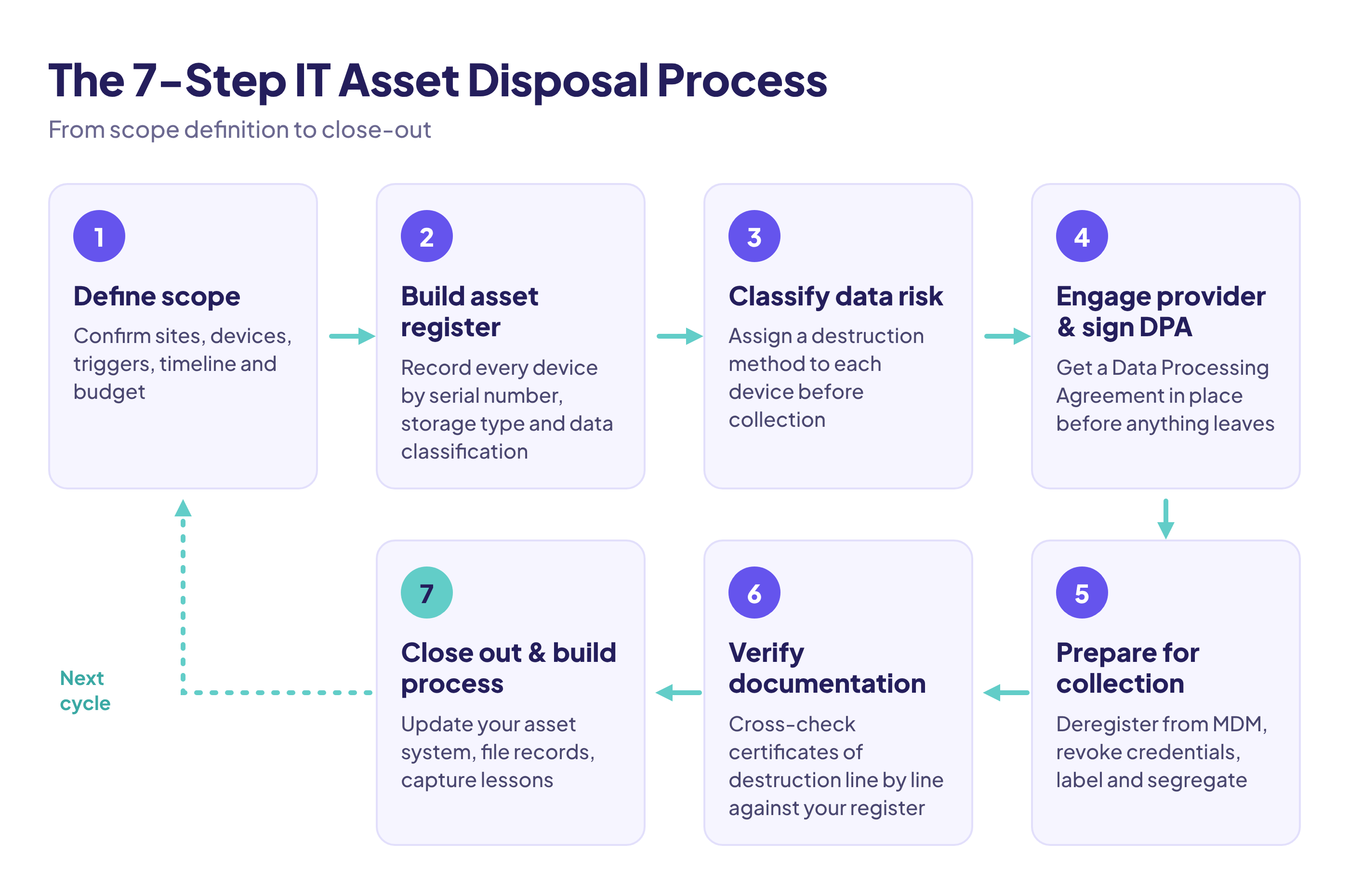
Step |
What You Do |
|---|---|
|
1. Define scope |
Confirm sites, devices, triggers, timeline, and budget before anything moves |
|
2. Build asset register |
Record every device by serial number, storage type, and data classification |
|
3. Classify data risk |
Assign a destruction method to each device before collection |
|
4. Engage provider and sign DPA |
Get a Data Processing Agreement in place before any device leaves your premises |
|
5. Prepare for collection |
Deregister from MDM, revoke credentials, label devices, segregate by method |
|
6. Verify documentation |
Cross-check certificates of destruction against your register line by line |
|
7. Close out and build process |
Update your asset system, file records, capture lessons for the next cycle |
Before a single device is moved, you need a clear scope. Disposal projects go wrong most often at this stage, when the scope is vague and assets get missed, double-counted, or retired without proper authorisation.
Answer these questions before anything else:
Getting clarity on scope at the outset prevents the most common operational problem: assets turning up after the collection has already happened because nobody confirmed they were in scope.
The asset register is the foundation of the entire disposal project. Every compliance obligation, every certificate of destruction, every resale outcome traces back to it. If your register is incomplete, your compliance documentation will be incomplete.
|
Field |
Why It Matters |
|---|---|
|
Make and model |
Determines resale value and destruction method |
|
Serial number |
Required for per-device certificates of destruction |
|
Internal asset tag |
Links to your own asset management system |
|
Storage type (HDD, SSD, NVMe) |
Determines appropriate data destruction method |
|
Data classification |
Drives the level of destruction required |
|
Location / assigned user |
Ensures physical recovery of the device |
|
Reason for retirement |
Required for audit records |
|
Intended outcome |
Resale, recycling, or destruction |
If your organisation has an IT asset management (ITAM) system, export it as your starting point and cross-reference against physical inventory. Do not assume the system is accurate: devices get moved, swapped, or informally retired without being logged.
For remote workers, send a formal recall notice with a clear deadline. Specify the return process, and track responses. Missing devices are a compliance gap, not just a logistics problem.
Pay particular attention to overlooked device types: printers, multifunction devices, network switches, and IP phones all hold configuration data and, in some cases, stored documents. They are routinely left out of disposal scopes, then disposed of through general waste - a WEEE and data compliance failure in one.
Once complete, freeze the register. Any additions after the collection process starts need to go through a formal amendment, not an informal addition to a spreadsheet.
Not every device in your disposal batch carries the same risk. Classifying data risk before the collection happens lets you specify the right destruction method for each device, which in turn determines cost, timeline, and the level of documentation you need.
High risk devices held or processed personal data, sensitive financial information, health records, or intellectual property. These require the most rigorous destruction method: physical shredding for SSDs and NVMe drives, certified wipe or degaussing for traditional HDDs, with per-device certificates of destruction in all cases.
Medium risk devices held configuration data, credentials, or operational information, but not personal data in large volumes. Certified data wiping to NIST 800-88 standards is generally appropriate, with a wipe report per device.
Low risk devices such as monitors, keyboards, and peripherals hold no internal storage and carry no data risk. These proceed directly to WEEE-compliant recycling without a data destruction step.
Classification drives your conversation with your ITAD provider. When you hand over your asset register, it should already indicate the required destruction method for each device. This avoids delays at the processing stage. It also prevents two costly mistakes: paying for physical destruction on devices that only needed a certified wipe, or accepting a wipe on a device that needed shredding.
Important: SSDs and NVMe drives cannot be reliably wiped using software overwriting. Wear-levelling means data can persist in cells that a standard overwrite never touches. Physical destruction is the only method that guarantees full data unrecoverability for flash storage. For the broader method discussion, see Data Sanitisation at Scale: Retiring Laptops & Mobile Devices Securely.
Once your asset register is finalised and data risk is classified, you are ready to formally engage your ITAD provider. This step has two distinct parts: the commercial engagement and the legal requirement.
Under GDPR, any third party that handles personal data on your behalf is a data processor. An ITAD provider handling devices that contain personal data is acting as your data processor, which means a written Data Processing Agreement must be in place before any device is handed over.
This is not optional. The DPA must specify:
Do not accept a generic terms-and-conditions document as a substitute for a DPA. If a provider cannot produce a compliant DPA, that is a significant red flag.
Once the DPA is signed, confirm the following in writing before the collection is scheduled:
For guidance on what certifications and credentials to verify in your provider before this stage, refer to the IT Asset Disposal Compliance Checklist.
The collection day itself should require minimal decision-making. If you have done the preceding steps properly, preparation is largely logistics. But there are a few things that need to happen before the collection team arrives.
At collection, your provider should issue a signed collection manifest listing every device by make, model, and serial number. Cross-check this against your asset register before signing. If there are discrepancies, resolve them before the vehicles leave.
Do not sign a manifest for devices you have not physically verified. A signed manifest starts the chain of custody record. Every device on it becomes your provider's legal responsibility from that point forward - and your liability ends only if the manifest is accurate.
After collection, your ITAD provider processes the devices and issues the documentation that closes out the project from a compliance perspective. This is the stage most organisations handle passively, simply filing whatever arrives. That is a mistake.
|
Document |
What It Confirms |
When You Should Receive It |
|---|---|---|
|
Collection manifest |
Devices received by provider |
Day of collection |
|
Asset reconciliation report |
Serial-level match of received vs. expected |
Within a few days of processing |
|
Certificates of destruction |
Per-device proof of data destruction |
On completion of destruction |
|
WEEE disposal documentation |
Compliant recycling of non-reusable equipment |
On completion of recycling |
|
Resale settlement report |
Value recovered and payment details |
On completion of resale |
|
Environmental/materials report |
Weight recycled, materials recovered |
On completion of full project |
Do not accept documentation at face value. Cross-check the certificates of destruction against your asset register line by line. Every device that was classified as high or medium risk should have a corresponding certificate with its serial number on it.
If a serial number appears in your register but not in the certificates, contact your provider immediately. A gap in the certificates is a gap in your compliance record.
Check the destruction method stated on each certificate against what was agreed. If a device requiring physical shredding shows a software wipe method on its certificate, that is a processing error that needs to be resolved before you file the documentation.
Once verified, update your internal asset management system to mark each device as disposed, including the certificate reference number and disposal date. If any devices held personal data, record the destruction in your Record of Processing Activities (RoPA) as required under GDPR.
The final step is not just filing the paperwork. It is using this project to build a repeatable process so the next disposal cycle is faster, better documented, and less disruptive.
Most organisations retain certificates of destruction and disposal documentation for a minimum of six to seven years, aligned with standard audit and regulatory review periods. Regulated sectors such as healthcare and financial services may have longer retention requirements. Check with your data protection officer or legal team if you are unsure what applies to your organisation.
Store disposal documentation in a location that is accessible to your compliance team, not just the IT department. If a GDPR investigation or regulatory audit occurs, the DPC or relevant authority will ask for this documentation, and the IT manager may not be the person who needs to retrieve it.
After each disposal project, document the following internally:
This becomes the basis for a standard operating procedure for IT asset disposal, which is particularly valuable for organisations with regular refresh cycles or multiple sites. For a shorter pre-flight version, see the IT Asset Disposal (ITAD) Compliance Checklist: GDPR & WEEE.
The most operationally mature approach to IT asset disposal is not treating it as a one-off project but embedding it into your regular hardware refresh cycle. Organisations that plan disposal in parallel with procurement consistently achieve better compliance outcomes, faster turnaround times, and higher resale value recovery. Treating it as an afterthought - something to sort out when the new hardware arrives - is where delays and documentation gaps begin.
The reason resale value matters here: devices retired at the right point in their lifecycle, rather than when they are fully obsolete, command meaningfully higher prices on secondary markets. A laptop retired at three years old recovers significantly more than the same model retired at five.
Running IT asset disposal well is not complicated, but it does require structure. The steps above give you a repeatable framework that satisfies GDPR, meets WEEE obligations, and produces the documentation you need to demonstrate compliance on demand.
If you are planning a disposal project and want a provider who handles the full process from collection through to certified destruction, resale assessment, and audit-ready reporting, speak to the Kefron ITAD team.

Define the scope. Confirm what triggered the project, which sites and devices are included, who can approve each asset for retirement, the deadline and the budget. Most disposal projects go wrong at this stage, when assets get missed or turn up after the collection has happened.
For each device, record the make and model, serial number, internal asset tag, storage type (HDD, SSD or NVMe), data classification, location or assigned user, reason for retirement and intended outcome (resale, recycling or destruction). The serial number matters most, because it is what your certificates of destruction are checked against.
Yes. Under GDPR, an ITAD provider handling devices that contain personal data is acting as your data processor. That means a written Data Processing Agreement must be in place before any device leaves your premises. A generic terms-and-conditions document is not a substitute.
Not reliably. Because of wear-levelling, data can persist in cells that a standard software overwrite never reaches. Physical destruction is the only method that guarantees full data unrecoverability for SSDs and NVMe drives.
You should receive a collection manifest, an asset reconciliation report, per-device certificates of destruction, WEEE disposal documentation, a resale settlement report if any devices were resold, and an environmental or materials report. Cross-check the certificates against your asset register line by line.
Most organisations keep certificates of destruction and disposal records for at least six to seven years, in line with standard audit and regulatory review periods. Regulated sectors such as healthcare and financial services may need to keep them longer.
Printers, multifunction devices, network switches and IP phones. They all hold configuration data and sometimes stored documents, yet they are often left out of disposal scopes and end up in general waste. That is a WEEE failure and a data compliance failure at the same time.