
How to Plan and Run an IT Asset Disposal Project: A Step-by-Step Guide
You have been handed the job of retiring 150 laptops, clearing a server room, or managing a...

Data sanitisation is the process of rendering data on a storage device unrecoverable for a given level of effort, and it is the control that determines whether retiring a fleet of laptops and phones is a routine operation or a breach waiting to be discovered. Handling end-of-life devices at scale means treating decommissioning as a controlled process with defined evidence at each step, not as a recycling task that happens after IT has finished with the hardware. This article covers what changed in the governing standard in September 2025, why a factory reset does not qualify, and how to design a workflow that holds up under audit.
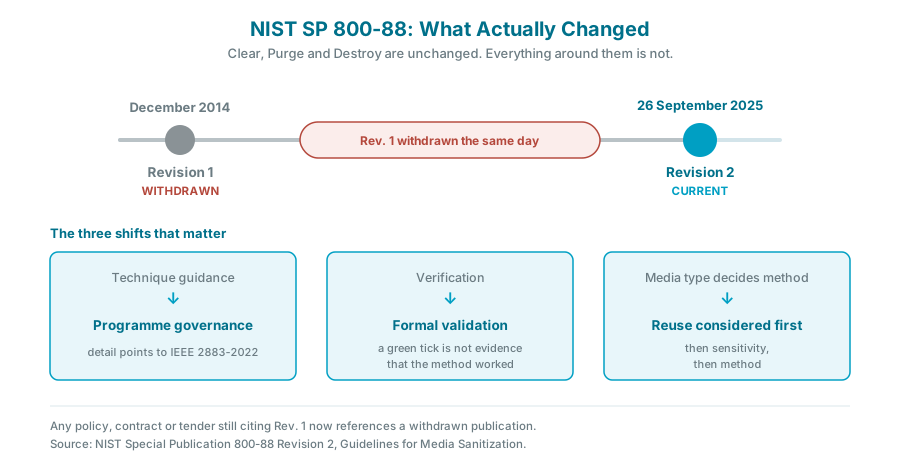
Figure 1: What NIST SP 800-88 Rev. 2 changed, and why policies citing Rev. 1 are now citing a withdrawn document.
Sanitisation renders access to target data infeasible for a given level of effort. That phrasing matters, because it makes sanitisation a risk decision rather than a single technique.
NIST groups every method into three categories, and Rev. 2 keeps this framework unchanged:
The common mistake is treating these as a ladder where more is always better. They are a selection framework. Destroying a fully encrypted, healthy laptop drive that could have been cryptographically erased and resold costs money and carbon for no additional security.
This is the part most published guidance on this topic has not caught up with, and it matters for anyone writing a policy or a tender this year.
NIST published SP 800-88 Rev. 2 as final on 26 September 2025, the first update since December 2014, and withdrew Rev. 1 in its entirety the same day. NIST's own announcement frames the revision around helping organisations set up a media sanitisation programme with methods and controls proportionate to information sensitivity.
|
|
Rev. 1 (2014, withdrawn) |
Rev. 2 (2025, current) |
|
Emphasis |
Device-level technique guidance |
Enterprise sanitisation programme and governance |
|
Technique detail |
Specified methods by media type |
Points to IEEE 2883-2022, NSA specifications or an organisation-approved standard |
|
Storage coverage |
Written when NVMe was niche and self-encrypting drives uncommon |
Addresses modern flash, NVMe, eMMC, UFS and self-encrypting drives directly |
|
Assurance |
Verification |
Separates verification from validation, and formalises validation |
|
Decision order |
Method driven by media type |
Reuse considered first, then data sensitivity, then method |
|
Documentation |
Certificate of sanitisation |
Updated certificate expectations tied to method and event |
Figure 2: Rev. 1 compared with Rev. 2. The framework of Clear, Purge and Destroy is unchanged. How you select, execute, validate and evidence it is not.
Three practical consequences follow.
Your policy probably cites a withdrawn document. If an internal standard, a supplier contract or a procurement specification says "sanitised in accordance with NIST SP 800-88 Rev. 1", that reference is now to a publication NIST has archived. Updating the citation is a small piece of work that an auditor will notice you have or have not done.
Verification and validation are not the same thing. Verification asks whether the tool reported success on this device. Validation asks whether the method, as implemented, actually achieves the intended sanitisation outcome, and whether that has been independently confirmed. A tool returning a green tick is verification. It is not, on its own, validation.
Reuse comes first in the decision order. Rev. 2 puts reuse ahead of method selection. That aligns the security standard with the sustainability position rather than setting them against each other, which is a useful thing to be able to say to a board.
A related point on legacy references. Some guidance still cites DoD 5220.22-M multi-pass overwriting. That approach predates modern flash storage and is not the current benchmark. If it appears in your documentation, it is a sign the documentation has not been reviewed in some time.
Deleting files removes pointers, not data. That much is widely understood. The less widely understood problem is that the standard remedy, overwriting, does not transfer cleanly from spinning disks to modern storage.
Solid state drives, NVMe drives and the flash storage in phones and tablets use wear levelling and over-provisioning. The controller distributes writes across physical cells and keeps spare capacity invisible to the operating system. An overwrite issued at the file system level therefore has no guarantee of reaching every physical cell that previously held data. Rev. 2 is explicit that an overwrite-only approach does not achieve Purge on this class of storage.
What works instead depends on the device:
The practical test is simple. If you cannot state which of Clear, Purge or Destroy a given method achieves on a given storage technology, you do not yet have a sanitisation method. You have a habit.
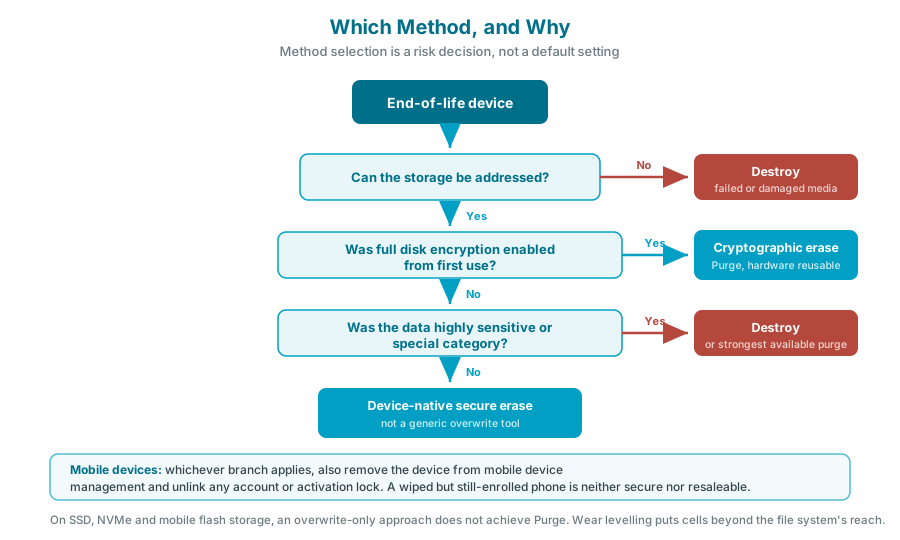
Figure 3: Method selection by storage technology, encryption status and data sensitivity.
|
Situation |
Preferred approach |
|
Encrypted modern laptop being redeployed internally |
Cryptographic erase, verified |
|
Corporate laptop being resold or donated |
Purge-level sanitisation appropriate to the storage technology, with a serialised certificate |
|
Device that held highly sensitive or special category data |
Stronger sanitisation, or physical destruction where risk appetite requires it |
|
Failed, unresponsive or physically damaged storage |
Physical destruction, because you cannot sanitise media you cannot address |
|
Smartphone or tablet |
Manufacturer-supported erase, combined with removal from mobile device management and account unlinking |
|
Loose drives, backup media, removable storage |
Destruction unless there is a specific reuse case with verified sanitisation |
Figure 4: Method selection is a risk decision, not a default setting.
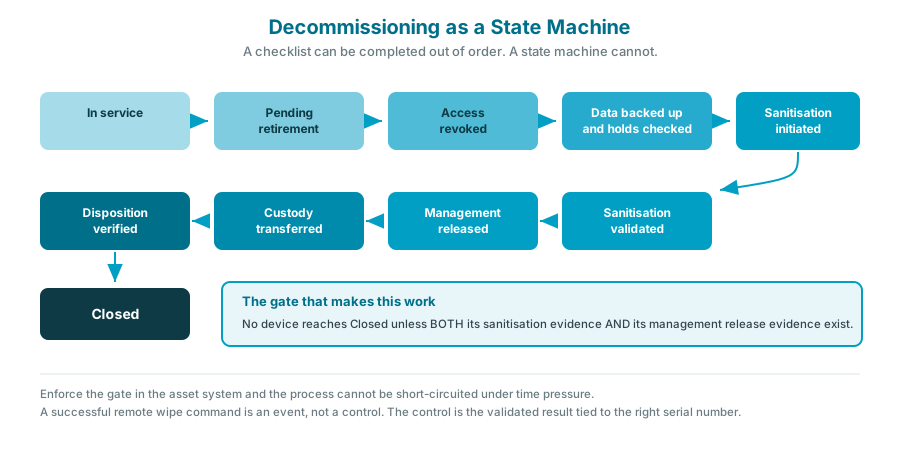 Figure 5: Decommissioning as a state machine. Each state has an entry condition that the previous state must satisfy.
At volume, the process needs to be a state machine rather than a checklist, because a checklist can be completed out of order and a state machine cannot.
1. Classify before touching the device. Record asset ID and serial or IMEI, user and department, device and storage type, ownership model, data sensitivity, encryption status, management platform and intended disposition. Sanitisation policy should be risk based, and you cannot apply a risk-based policy to a device you have not classified.
2. Freeze access. Disable or transfer the user's access, revoke active sessions and tokens, confirm corporate data has synchronised to approved storage, and recover credentials, certificates and security keys. Preserve anything under legal hold before it becomes irretrievable.
3. Do not delete the management record too early. You may still need it to issue or verify the wipe. Removing a device object before the sanitisation is confirmed can also strip recovery keys you have not finished with. Sequence matters, and this is the step most often got wrong.
4. Sanitise according to the classification, using the method selected for that storage technology and sensitivity level.
5. Validate, then evidence. Record asset and serial number, method, tool and version, operator or provider, date and time, result, validation result, any exception, and final disposition. A serialised record per device, not a line item saying one hundred laptops destroyed.
6. Release from management and ownership. Remove the device from mobile device management and from any vendor enrolment or ownership programme, so it does not reappear as a stale record or refuse to activate for its next owner.
7. Transfer physical custody under a logged handoff.
8. Confirm final disposition and close the record.
The control that makes this work is a single rule: no device reaches disposed status unless both its sanitisation evidence and its management release evidence are present. Enforce that in the asset system and the process cannot be short-circuited under time pressure.
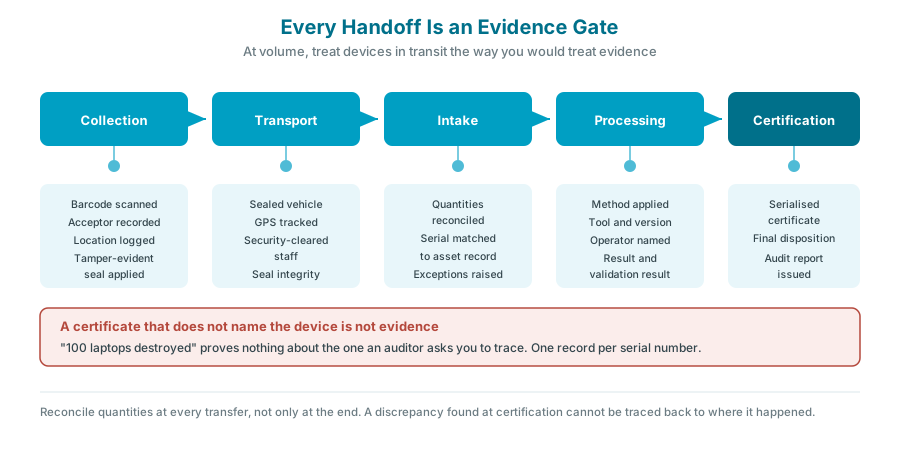 Figure 6: Every handoff is an evidence gate. Quantities reconcile at each transfer.
At volume, treat devices in transit the way you would treat evidence. Scan the asset barcode at every handoff, record who accepted custody and where, use tamper-evident containers for sensitive devices, and reconcile quantities at each transfer rather than only at the end.
A certificate that is worth holding names the individual asset. Generic statements of quantity are not evidence. Each record should carry:
When contracting an external provider, the contract should specify the sanitisation standard, chain of custody controls, breach notification obligations, subcontractor disclosure, certificate format, audit rights, geographic restrictions on processing, environmental compliance, and liability and insurance cover.
Fleets do not leak through the devices that follow the happy path. They leak through these:
Each of these needs a designed path rather than a technician's judgement in the moment. The general shape is: cannot sanitise remotely, so quarantine, retrieve, apply approved offline sanitisation, validate independently, then dispose.
One trap deserves a specific mention. Automated cleanup rules in device management platforms typically hide or remove stale records that have not checked in. They do not wipe or retire the physical device. A tidy console is not a sanitised fleet, and the two processes must stay separate but linked.
The instinct at scale is to automate the workflow end to end and treat a successful remote wipe command as completion. It is worth resisting.
A remote wipe command is an event. It tells you an instruction was issued and, at best, acknowledged. The security control is the combination of a validated sanitisation result, a correctly matched asset identity, a confirmed release from management, and a documented chain of custody. Automate the workflow by all means. Do not automate the trust.
The organisations that come through an audit cleanly are usually not the ones with the most sophisticated tooling. They are the ones that can produce, for any serial number an auditor picks at random, the full evidence chain for that specific device.
For organisations operating in Ireland, three obligations run in parallel and are often managed by different people.
Data protection. Under the GDPR, personal data held on retired devices remains your responsibility until it is genuinely unrecoverable. Guidance is published by the Data Protection Commission. The relevant question in an investigation is not whether you intended to erase the data but whether you can evidence that you did.
Environmental compliance. End-of-life IT is waste electrical and electronic equipment, governed in Ireland by the European Union (Waste Electrical and Electronic Equipment) Regulations 2014. WEEE Ireland sets out producer obligations, and the Environmental Protection Agency publishes guidance on who is responsible for what.
Information security management. Where an organisation holds ISO 27001, media handling and disposal sit within the scope of the management system, which means sanitisation evidence is in scope for surveillance audits.
These three are frequently owned by IT, facilities and compliance respectively. The single most common structural failure is that no one person can see all three sets of evidence for the same device.
Kefron's IT asset disposal service handles end-of-life laptops, smartphones, tablets, servers, network hardware and loose drives under chain of custody controls, with assets collected in sealed, GPS-tracked vehicles by security-cleared staff and processed in certified facilities. Every device is logged and tracked from collection to completion, and certificates of destruction, audit reports, inventory lists with serial tracking and environmental recycling statements are issued for each project.
Where drives are to be sanitised for reuse rather than destroyed, Kefron is a Blancco Gold Partner and provides certified wiping to support safe redeployment or resale. Where destruction is the right answer, hard drive shredding is available on site using mobile shredding units, with drives shredded to 20 mm, the process witnessable in real time, and a certificate issued immediately.
On the disposition side, IT equipment resale and value recovery covers refurbishment and resale of eligible devices through verified channels after sanitisation is confirmed. Kefron operates a zero landfill commitment with less than 1% of materials going to landfill, and all recycling remains within the EU. The IT recycling savings calculator gives an indication of recoverable value before a refresh cycle begins.
Relevant certifications include ISO 27001, ISO 9001, ISO 14001 and ISO 45001, BS 7858 and BS EN 15713, Cyber Essentials Plus, PAS 2060 carbon neutral certification, and Irish Security Industry Association membership.
→ Talk to the Kefron team about retiring a device fleet
What is data sanitisation?
Data sanitisation is the process of rendering data on storage media unrecoverable for a given level of effort. It is broader than deletion and broader than a factory reset, and the appropriate method depends on the storage technology and the sensitivity of the information.
What is the current version of NIST 800-88?
NIST SP 800-88 Rev. 2, published on 26 September 2025. It superseded Rev. 1, which was published in December 2014 and withdrawn on the same day Rev. 2 was released.
What is the difference between Clear, Purge and Destroy?
Clear uses logical techniques that defeat simple recovery attempts. Purge renders recovery infeasible even with laboratory techniques. Destroy physically renders the media unusable. All three remain in Rev. 2.
Is a factory reset enough to wipe a company laptop?
Generally no. A factory reset is not designed as a sanitisation control, and on solid state and flash storage an overwrite-based approach does not reliably reach every physical cell because of wear levelling and over-provisioning.
What is cryptographic erase?
Cryptographic erase destroys the encryption key rather than the data, leaving only unreadable ciphertext. It is fast and preserves the hardware for reuse, but it only works where full disk encryption was correctly enabled from the outset, which is why encryption status should be recorded in the asset register.
How should mobile phones and tablets be handled differently from laptops?
Mobile devices need the manufacturer-supported erase combined with removal from mobile device management and unlinking from any account or activation lock. A device that is wiped but still enrolled or account-locked is neither secure nor resaleable.
What should a certificate of sanitisation contain?
Asset and serial number, method used, tool and version, operator or provider, date and time, result and validation result, any exception, and final disposition. A certificate that does not identify individual devices by serial number is not evidence.
What happens to devices that cannot be wiped remotely?
They should follow a defined exception path: quarantine, retrieval, approved offline sanitisation, independent validation, then disposition. Devices with failed storage generally go to physical destruction, because media that cannot be addressed cannot be sanitised.
Does deleting a device record from our management platform wipe it?
No. Cleanup rules that remove stale records from a management console do not sanitise the physical device. Console hygiene and physical disposition are separate processes and need to be reconciled against each other.
What regulations apply to end-of-life IT equipment in Ireland?
The GDPR governs the personal data on the device, the European Union (Waste Electrical and Electronic Equipment) Regulations 2014 govern the hardware as waste, and ISO 27001 brings media disposal into scope for certified organisations.
Retiring devices at scale is a records problem wearing a hardware costume. The wipe itself is rarely the hard part. The hard parts are knowing what was on each device before it left, proving what was done to it, keeping the asset identity attached to the evidence, and having a designed answer for the devices that do not behave.
Two things are worth doing this quarter regardless of anything else. Check whether your sanitisation policy still cites NIST SP 800-88 Rev. 1, and pick a serial number at random to see whether you can reconstruct its full evidence chain. If either answer is uncomfortable, that is the work.