.png?width=120&height=120&name=Favicon%20(500%20x%20500%20px).png)


How to Plan a Document Scanning Project: A Practical Guide
Most document scanning projects run into trouble before a single page is scanned. The scope gets...

Intelligent document processing (IDP) is a technology that reads an inbound document, determines what it is, extracts the relevant fields, and sends it to the right team or system without a person opening it first. The routing decision is the part most people underestimate. Reading a page is largely a solved problem. Deciding where that page belongs, and knowing when the system is not confident enough to decide, is what separates automation that works from automation that quietly misfiles things. This article explains how that decision is made, the five methods used to make it, and what happens to the documents the system cannot place.
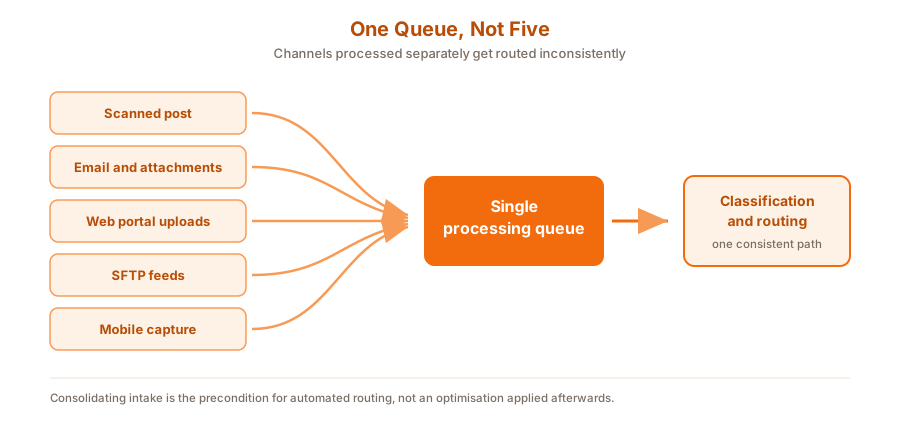
Figure 1: Every channel lands in one queue. That consolidation is what makes automated routing possible.
Intelligent document processing is the layer that sits between capturing a document and doing something with it. It converts an image into text, determines the document type, extracts structured data from unstructured content, and hands both the file and its metadata to a downstream system.
The distinction from plain OCR matters and is worth being precise about. OCR converts pixels into characters. It tells you the page contains the words "invoice", "Acme Ltd" and "£4,120". It does not tell you that this is a supplier invoice, that Acme is a known vendor, that the value crosses an approval threshold, or that it belongs in accounts payable. IDP adds that interpretation layer.
Research published by the Association for Intelligent Information Management with Deep Analysis, surveying 600 enterprises, found 78% of organisations now operational with AI technology. The same study reported a shift in what organisations are processing: HR files and contracts have become as common a use case as invoices and financial statements, which matters because those are long, unstructured documents that older template-based capture handled badly.
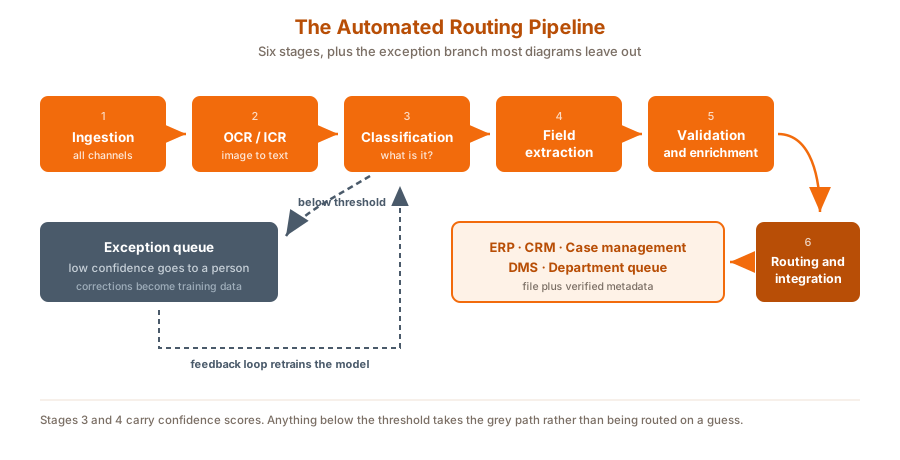
Figure 2: The pipeline, with the exception branch that most vendor diagrams leave out.
1. Ingestion. Inbound items are captured from every channel into one queue: scanned post, email and attachments, web portal uploads, SFTP feeds and mobile capture. Consolidation is the precondition for everything that follows. Channels processed separately get routed inconsistently.
2. OCR and extraction. Optical character recognition converts images to text. Intelligent character recognition handles handwriting and constrained form fields. Modern engines analyse page layout and position, not just character strings, which is what allows a total to be distinguished from a subtotal.
3. Classification. The system determines document type: invoice, complaint, contract, claim, application, purchase order, legal notice, general correspondence. This is the routing decision in embryo.
4. Extraction of routing fields. The system pulls the specific values that determine destination: named department or individual, customer or account number, supplier, case or claim reference, urgency markers, region.
5. Validation and enrichment. Extracted identifiers are cross-referenced against internal systems. A VAT number is checked against the supplier master, an account number against the CRM, so the document arrives with verified metadata rather than raw text.
6. Routing and integration. File and metadata are pushed to the destination system through an API or connector, into an ERP, CRM, case management platform, document management system or departmental queue, with the handoff logged.
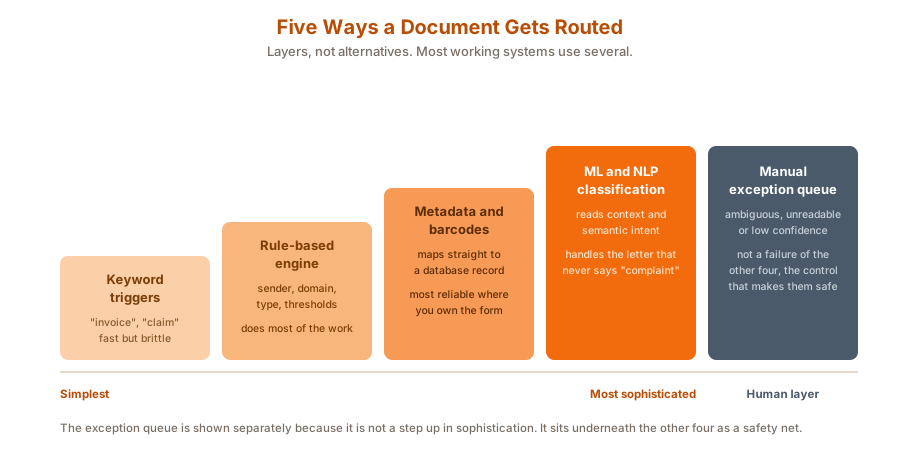
Figure 3: The five methods, ordered by sophistication. Most working systems layer several.
These are usually presented as alternatives. In practice they are layers, and the sequence in which they are applied determines both accuracy and cost.
Keyword-based routing evaluates text for pre-defined trigger words such as "invoice", "claim" or "complaint" and assigns the document to a matching queue. Cheap, fast, transparent, and brittle. A complaint that never uses the word "complaint" goes to the wrong place.
Rule-based engine routing combines conditions rather than matching single terms: sender address, sending domain, recipient alias, document type and value thresholds, applied as sequential or conditional policies. This is where most of the practical routing work actually gets done.
Metadata and barcode extraction reads structural elements rather than prose. Barcodes, QR codes, cover sheets and form field values map a document directly to a database record. Where you control the inbound form design, this is the most reliable method available, because it removes interpretation entirely.
Machine learning and NLP classification uses trained models to interpret semantic content, context and structure. This is what handles the unstructured material that defeats the other four methods: a two-page letter that is functionally a complaint but never says so.
Manual exception queue diverts ambiguous, unreadable or low-confidence results to a human validation desk for tagging. Not a failure of the other four. The control that makes them safe to run.
|
Method |
Best suited to |
Main limitation |
|
Keyword triggers |
High-volume, predictable document types |
Misses anything phrased unexpectedly |
|
Rule-based engine |
Known senders, structured business logic |
Rule sets grow complex and need maintenance |
|
Metadata and barcodes |
Forms and documents you control the design of |
Useless on inbound material you do not control |
|
ML and NLP classification |
Unstructured correspondence, long documents |
Needs training data and ongoing monitoring |
|
Exception queue |
Everything the other four cannot place confidently |
Costs human time, so the rate must be tracked |
Figure 4: Routing methods compared. The right answer is usually a layered combination, not a single choice.
Rules become concrete quickly. A working rule set combines classification, an extracted field and a business condition.
|
Document type |
Extracted condition |
Destination |
|
Invoice |
Supplier matches vendor master |
Accounts payable, indexed to supplier and invoice number |
|
Invoice |
Value above approval threshold |
Accounts payable, senior approval workflow |
|
Complaint |
Account number present |
Customer service, assigned to that account team |
|
Claim |
Claim reference present |
Claims, matched to the existing case |
|
Contract |
Any |
Legal, contract repository |
|
Job application |
Any |
Recruitment inbox |
|
Correspondence |
Contains special category personal data |
Restricted-access queue, limited handling |
Figure 5: Illustrative routing logic. Each row combines a classification with an extracted value.
The final row is the one organisations most often add late, after a near miss. It deserves to be designed in from the start.
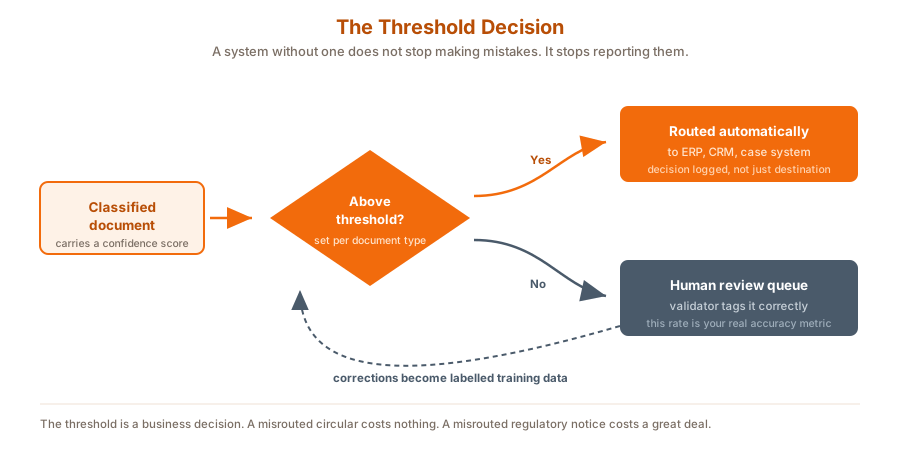
Figure 6: The threshold decision, and the feedback loop that most implementations never close.
This is the single most important design decision in automated routing, and the one most likely to be skipped.
Every classification and extraction carries a confidence score. Above a set threshold, the document routes automatically. Below it, the document goes to a human validation desk instead of being routed on a guess. A system without a threshold does not stop making mistakes. It stops telling you it is making them, which is considerably worse, because a misrouted document looks identical to a correctly routed one until somebody goes looking for it.
Three things follow from taking the threshold seriously:
The instinct in most automation projects is to push the confidence threshold down, because a lower threshold produces a higher automation rate and a better-looking dashboard. It is the wrong instinct.
The cost of a document sitting in an exception queue for four hours is small and visible. The cost of a document confidently delivered to the wrong department is larger and invisible, sometimes for weeks. Organisations that run automated routing well tend to start with a conservative threshold, tolerate a higher exception rate than they would like, and lower it only once they have enough labelled corrections to justify the move. That approach looks slower in month one and is materially better by month six.
Automated routing is a personal data processing activity, and inbound post is where the most sensitive material arrives.
Special category data needs its own path. Health information, and documents containing identifiers such as PPS numbers or National Insurance numbers, should be classified and routed into restricted queues rather than general departmental inboxes. Under the GDPR, access minimisation is not satisfied by a document being technically retrievable only by the right team if the routing step exposed it more widely first. Guidance is available from the Data Protection Commission in Ireland and the Information Commissioner's Office in the UK.
The audit trail has to survive the handoff. When a document moves from the capture platform into an ERP or case management system, the record of receipt, classification, routing decision and recipient should remain reconstructable end to end.
Retention starts at capture, not at filing. Physical originals held after scanning, and copies sitting in intermediate processing queues, are both in scope. A retention rule that only covers the destination system leaves the middle of the pipeline unmanaged.
Cross-border processing needs to be explicit. Where capture, OCR or classification is performed outside the jurisdiction, that should be a documented decision rather than an implementation detail inherited from a vendor's default architecture.
Kefron's digital mailroom services combine scanning, intelligent routing and secure digital delivery, moving inbound items from envelope to the right inbox with custom routing rules and full audit trails. Mail is handled in ISO 27001 certified environments with encryption, access controls and chain of custody tracking, and incoming documents are digitised and delivered within hours rather than days.
Kefron is a member of the Association for Intelligent Information Management, which is where much of the independent research on this topic originates.
Two published examples show the range. A global financial services business streamlined its mail and document management across multiple countries. A public regulatory body shifted to remote mail handling, with the Medical Council noting that combining post and record management smoothed the transition to fully remote working.
Where routing feeds finance specifically, inbound invoices can pass from capture straight into AP automation for matching and approval, and captured documents can be held in an online document management system rather than a departmental folder.

→ Talk to the Kefron team about inbound document routing
What is intelligent document processing?
Intelligent document processing is technology that captures a document, converts it to text, determines what type of document it is, extracts the relevant data fields and passes both the file and its metadata to a downstream system. It combines OCR with classification and machine learning rather than relying on templates.
What is the difference between OCR and intelligent document processing?
OCR converts an image into readable text. It does not interpret what the text means. Intelligent document processing adds classification, contextual analysis and data extraction on top, so the system can determine document type and destination rather than simply producing a searchable file.
How does a system decide what type of document it is looking at?
Classification can draw on the text content, the page layout, the sender, embedded metadata such as barcodes, and trained machine learning models. Most production systems combine several signals rather than relying on one.
What is a confidence score in document processing?
A confidence score is the system's own assessment of how certain it is about a classification or an extracted value. It is compared against a threshold to decide whether the document routes automatically or goes to a person for checking.
What happens to documents the system cannot classify?
They go to an exception queue for human review. A validator tags the document correctly and it continues through the workflow. Those corrections can then be fed back as training data to improve future accuracy.
Can automated document routing integrate with ERP and CRM systems?
Yes. Once a document is classified and its key fields extracted, the file and its metadata are pushed to the destination through an API or a pre-built connector, so the item enters the receiving system's own workflow rather than sitting in a separate repository.
How accurate is automated document classification?
Accuracy varies by document type and by how structured the inbound material is. Forms whose design you control are close to fully reliable. Unstructured correspondence is harder. The meaningful measure is the exception rate by document type, rather than a single headline accuracy figure.
Is automated document routing GDPR compliant?
It can be, and the routing design is part of what determines that. Special category data should be classified into restricted queues, the audit trail should survive the handoff into downstream systems, retention should cover intermediate processing stages as well as the destination, and any cross-border processing should be documented.
Automated document routing is not really a scanning problem. Capture and OCR are mature, and any credible provider will handle them competently. The decisions that determine whether a system works are further down: which routing methods you layer and in what order, where you set the confidence threshold for each document type, whether the exception queue is staffed, and whether corrections make it back into the model.
Get those right and inbound post stops being a distribution task and becomes the front end of a workflow. Get them wrong and you have built something that misfiles documents faster than people did.