Paper invoices still account for a significant share of accounts payable volume in mid-market finance teams. The challenge is not just digitising those invoices; it is getting reliable reporting and analytics from the data they carry. Kefron AP gives you AP automation built to capture, code, and report on paper-heavy invoice workflows at 99%+ data accuracy.
Choosing the right platform means evaluating how each tool handles paper invoice capture, coding accuracy, and the depth of its reporting dashboards. This guide compares seven AP automation solutions through the lens of reporting and analytics for teams still processing a high volume of paper invoices.
Quick guide: 7 best AP automation tools for paper invoice analytics
- Kefron AP: The best AP automation platform for paper invoice reporting with real-time analytics dashboards and 99%+ extraction accuracy.
- Basware: Handles high-volume invoice ingestion across multiple formats with configurable dashboards.
- Coupa: Provides spend analytics as part of a broader procurement suite for organisations with complex indirect spend.
- Tungsten Automation: Offers document intelligence and capture-focused analytics for invoice processing workflows.
- Medius: Includes AI-driven coding with built-in analytics for invoice lifecycle visibility.
- Ramp: Features invoice automation with built-in expense tracking for finance teams consolidating AP and spend.
- AvidXchange: Covers invoice-to-payment workflows with reporting tools designed for mid-market organisations.
How we chose the best AP automation tools for paper invoice analytics
We evaluated each platform based on how well it serves finance teams that still process a high proportion of paper invoices and need actionable reporting from that data. Here is what guided our selection:
- Paper invoice capture accuracy: Can the platform digitise paper invoices reliably using OCR or AI extraction, so your reports start with clean data rather than manual corrections?
- Reporting depth and usability: Does the platform offer real-time dashboards, pre-built reports, and drill-down capability so you can track invoice status, cycle times, and exceptions without exporting to spreadsheets?
- Coding automation: Can the tool auto-code invoices based on historical patterns, reducing the manual effort that distorts spend reporting?
- ERP integration: Does the platform connect to the ERP systems common in mid-market finance teams (SAP, Oracle, Microsoft Dynamics, NetSuite, Sage) so reporting data stays synchronised?
- Touchless processing rate: What share of invoices can move from capture to approval without manual intervention, directly improving the reliability of your analytics?
- Exception and bottleneck visibility: Can you see where invoices stall, which suppliers cause the most rework, and which approvers create delays?
- Scalability for paper-heavy workflows: Does the platform handle growing invoice volumes, including mixed paper, PDF, and XML formats, without degrading capture quality?
The 7 best AP automation tools for paper invoice analytics
1. Kefron AP: Best overall AP automation for paper invoice analytics
Kefron AP is purpose-built for finance teams that process a high volume of paper invoices and need reporting they can act on. Where many platforms treat paper capture as a secondary feature, Kefron AP places it at the centre of the workflow: invoices arrive by post, email, or scan, and AI-powered extraction pulls header and line-item data at 99%+ accuracy after validation by a dedicated Data Assurance Team.
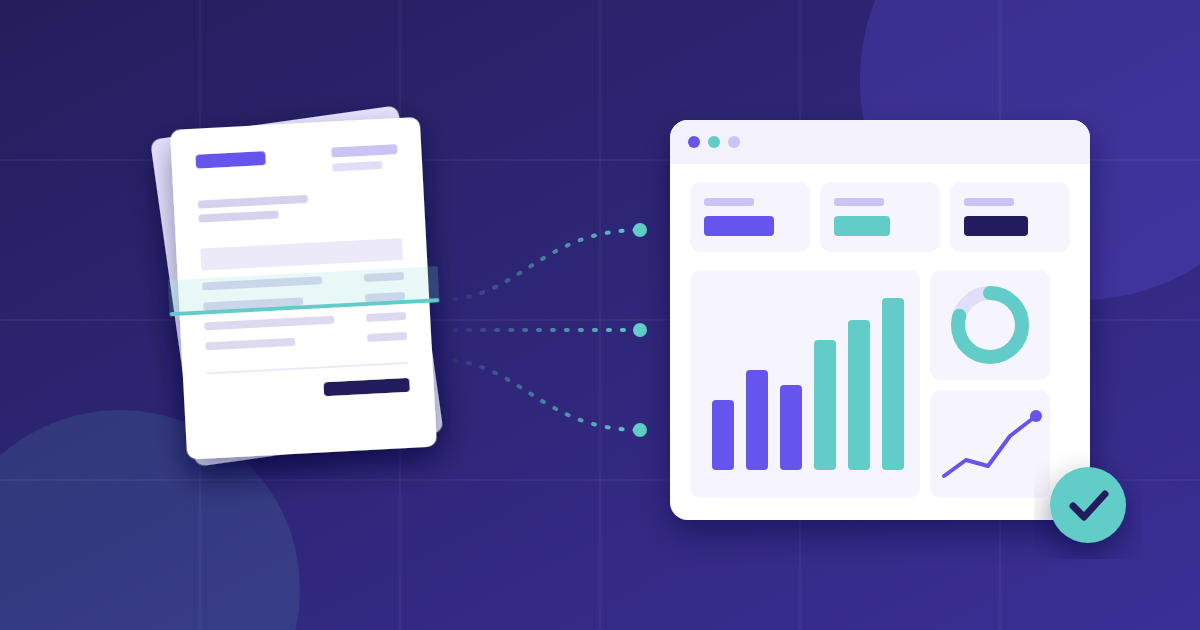
That accuracy matters for analytics because every downstream report depends on the data being right at capture. Kefron AP includes real-time AP analytics dashboards covering ageing, extraction quality, touchless processing rates, approval turnaround, duplicate detection, and cost per invoice. You can filter by supplier, entity, department, or date range, so your team spends time analysing trends rather than rebuilding spreadsheets.
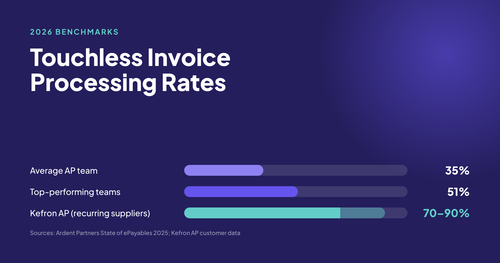
Recurring suppliers typically reach 70% to 90% touchless processing, which means most of your paper-originated invoices flow through capture, coding, matching, and approval without anyone opening them. The remaining invoices route to your team only when genuine exceptions need a decision.
Kefron AP connects to over 70 ERP systems, including SAP, Oracle, Microsoft Dynamics, NetSuite, Sage, and AccountsIQ, through a real-time API or Kefron Konnect (a secure SFTP file transfer). Invoice data syncs automatically with a full audit trail, so your ERP reporting reflects what actually happened in AP.
Kefron AP features
- AI extraction with Data Assurance: Machine learning captures invoice data across 100+ languages, and a human assurance team validates uncertain fields in real time, delivering 99%+ accuracy rather than leaving you to fix OCR errors.
- Real-time analytics dashboards: Six pre-built dashboards (ageing, extraction analytics, ROI, user productivity, received vs processed, and PO matching verification) give you a complete view of AP performance without manual data pulls.
- Automated coding: AI learns from your past GL coding patterns and pre-fills cost codes on non-PO invoices, keeping spend allocation consistent and your reports accurate.
- Line-level PO matching: Invoices are matched against purchase orders at line-item level using AI prompts that flag discrepancies, reducing the exception rate that clouds your analytics.
- Duplicate detection and fraud prevention: A three-step verification process checks supplier, number, amount, and date, catching near matches alongside exact duplicates before payment.
- Document Centre with SmartSearch: All AP documents live in a central, searchable hub with tags and bulk actions, so audit retrieval and ad-hoc reporting take seconds rather than hours.
Kefron AP pros and cons
Pros:
- 99%+ extraction accuracy backed by a dedicated Data Assurance Team, not OCR alone, which means your reports start with clean data from day one.
- Included analytics dashboards with no add-on costs, covering the KPIs that mid-market AP teams track most.
- 70+ ERP connectors with automatic syncing, so reporting data stays aligned across systems.
Cons:
- The platform focuses on AP automation and e-invoicing rather than broader procurement, so teams needing sourcing or contract management would use a separate tool alongside it.
- Advanced dashboard customisation options are expanding but may require input from your Customer Success Manager for complex configurations.
- Implementation timelines of 6 to 8 weeks suit most mid-market teams, though organisations with highly complex multi-ERP environments may need additional configuration time.
2. Basware: High-volume invoice ingestion with configurable reporting
Basware focuses on automating invoice processing at scale for globally operating organisations. The platform uses its SmartPDF technology to capture machine-readable PDF invoices and convert them into electronic format automatically. It supports PO and non-PO invoice matching at both header and line level.
Basware includes a reporting module called Insights Studio, which allows finance teams to build custom queries and visualisations around AP data. The platform also offers a process cost discovery dashboard that highlights where manual effort concentrates in the invoice workflow.
Basware features
- SmartPDF capture: Converts machine-readable PDF invoices into electronic format without templates, reducing manual data entry for paper-originated scanned documents.
- Insights Studio: A configurable analytics module that lets you build custom reports around invoice data, approval times, and exception patterns.
- Flexible matching: Matches invoices using combinations of POs, goods receipts, quality checks, and contracts at line or header level.
Basware pros and cons
Pros:
- Handles high invoice volumes across multiple ERP environments and global entities.
- Insights Studio gives finance teams the ability to build custom AP reports without IT involvement.
- Supports multiple invoice formats including EDI, XML, and PDF alongside paper-originated scans.
Cons:
- SmartPDF requires machine-readable PDFs; invoices that arrive as images or handwritten paper may need additional processing steps.
- The platform is designed for organisations processing more than 50,000 invoices per year, so smaller teams may find the feature set broader than needed.
- Custom report building in Insights Studio requires initial setup and familiarity with the module's query structure.
3. Coupa: Spend analytics within a broader procurement platform
Coupa offers AP automation as part of its wider procure-to-pay suite, which includes sourcing, contract management, and spend analysis. Its invoice processing uses Rossum AI for template-free document ingestion across multiple languages and formats. Two-way and three-way matching handles PO-based invoices.
The spend analysis module provides pre-built dashboards and AI-driven classification that categorises spend data across ERP systems. Coupa's analytics draw from a community data set of anonymised transaction data, which it uses to generate benchmarking insights.
Coupa features
- Template-free document ingestion: Uses a transactional large language model to capture invoices in any format, source, or language without pre-configured templates.
- Spend analysis dashboards: Offers out-of-the-box reports and AI-powered classification to categorise and visualise spend across entities and ERP systems.
- Community benchmarking: Provides spend benchmarking insights derived from anonymised data across its customer base.
Coupa pros and cons
Pros:
- Offers end-to-end procure-to-pay coverage, so teams needing sourcing and contract management alongside AP can use one platform.
- AI-driven spend classification reduces the manual effort of categorising invoice data for analysis.
- Supports global compliance and e-invoicing across 50+ countries.
Cons:
- The platform is a full procurement suite, which means AP-only teams may encounter features they do not use.
- Deployment and configuration for the complete procure-to-pay stack typically requires a longer implementation timeline than AP-focused tools.
- Paper invoice capture is one component of the broader platform rather than a primary design focus.
4. Tungsten Automation: Document intelligence for invoice capture analytics
Tungsten Automation (formerly Kofax) provides invoice automation through its InvoiceAgility+ platform, which handles invoice capture, matching, coding, and reconciliation. The platform includes persona-driven dashboards that adapt their view depending on the user's role, from AP Processor to CFO.
The analytics module covers extraction quality monitoring, field statistics, invoice volume tracking, user performance, and payment performance. Reports are available for both the capture stage and the downstream AP workflow, giving visibility into where manual intervention happens.
Tungsten Automation features
- Extraction quality monitor: Tracks capture accuracy at the field level and identifies which vendors or document types cause the most extraction errors.
- Persona-driven dashboards: Adapts the analytics view to match the user's role, showing AP processors operational metrics and finance leaders strategic summaries.
- Invoice volume and workflow reporting: Provides reports on document status, volumes, workflow stages, and payment performance across the AP lifecycle.
Tungsten Automation pros and cons
Pros:
- Detailed extraction-level analytics help you identify which suppliers and document types need attention.
- Persona-driven dashboards mean different team members see the metrics relevant to their responsibilities.
- Supports global e-invoicing compliance with supplier connectivity built into the platform.
Cons:
- The platform's analytics are split between capture-stage and process-stage modules, which may require switching between views to get the full picture.
- Configuration for complex multi-ERP environments may require partner involvement or managed services.
- The InvoiceAgility+ rebrand and interface redesign means teams adopting the platform now are working with a recently updated product.
5. Medius: AI-driven coding with invoice lifecycle analytics
Medius offers AP automation with embedded AI that handles invoice capture, coding, approval routing, and payment. The platform's SmartFlow coding engine uses a proprietary neural network trained on the customer's historical coding actions, reaching 95%+ coding precision after processing a small number of invoices per pattern.
Medius Analytics provides dashboards covering cashflow management, supplier payment visibility, and process bottleneck detection. Finance teams can access pre-defined reports on open invoices, archived invoices, and user activity, as well as build custom reports using the capture reporting data source.
Medius features
- SmartFlow AI coding: A proprietary neural network that learns from your historical coding corrections and reaches 95%+ precision, reducing manual cost allocation work.
- Medius Analytics dashboards: Covers cashflow management, supplier payment patterns, and process bottleneck identification with pre-built and customisable reports.
- Capture reporting: Provides field-level data on capture performance, allowing you to identify which vendors can activate touchless capture.
Medius pros and cons
Pros:
- AI coding precision improves with each processed invoice, reducing manual corrections over time.
- Analytics dashboards cover both operational AP metrics and strategic cashflow insights.
- Supports 100+ ERP integrations including SAP, Oracle, Microsoft Dynamics, and NetSuite.
Cons:
- The SmartFlow coding model requires an initial learning period with your specific data before reaching its stated accuracy levels.
- Advanced custom reporting requires familiarity with the platform's data sources and report builder.
- The platform's paper invoice handling depends on its capture engine, which may require additional configuration for non-standard document layouts.
6. Ramp: Invoice automation with consolidated spend reporting
Ramp provides invoice automation alongside corporate card and expense management, consolidating AP and spend data into one platform. The invoice module uses OCR and AI to capture invoice data and route documents through approval workflows. Ramp's reporting focuses on combining invoice spend with card spend to give finance teams a unified view of outgoing cash.
The platform is designed for fast-growing companies that want to manage invoices and expenses together. Its reporting covers invoice status, approval workflows, and spend by category, vendor, or department.
Ramp features
- Unified spend reporting: Combines invoice and card expense data into one reporting view, so you can analyse total outgoing spend without consolidating separate systems.
- AI-powered invoice capture: Extracts invoice data using OCR and machine learning, then routes invoices through configurable approval workflows.
- Vendor and category analytics: Tracks spend by vendor, department, and category to help identify cost patterns and negotiation opportunities.
Ramp pros and cons
Pros:
- Combines AP invoicing with corporate card management, reducing the number of platforms finance teams use.
- Provides spend visibility across both invoice and card transactions in a single dashboard.
- Includes automated policy enforcement that flags out-of-policy spend before approval.
Cons:
- The platform's AP module is part of a broader spend management tool, so teams focused solely on paper invoice processing may find some features less relevant.
- ERP integration options are more limited compared to platforms specifically designed for AP automation at scale.
- Paper invoice capture is handled through OCR, with accuracy dependent on document quality and format consistency.
7. AvidXchange: Invoice-to-payment workflows with mid-market reporting
AvidXchange provides AP automation covering invoice capture, approval workflows, and payment execution for mid-market organisations. The platform automates the full invoice-to-payment cycle and includes reporting on invoice status, approval timelines, and payment performance across departments.
AvidXchange's analytics give AP managers visibility into where invoices sit in the workflow and which approvers create delays. The platform supports multiple invoice intake channels, including paper, email, and electronic formats, and includes a supplier network for managing vendor payment preferences.
AvidXchange features
- Invoice-to-payment automation: Covers the full cycle from invoice receipt through coding, approval, and payment execution in one workflow.
- Approval workflow analytics: Reports on approval timelines, bottlenecks, and payment status to help AP managers identify delays.
- Multi-channel invoice intake: Accepts invoices via paper, email, EDI, and electronic formats, centralising them into one processing queue.
AvidXchange pros and cons
Pros:
- Covers invoice-to-payment in a single platform, including the payment execution step that some AP tools do not include.
- Designed for mid-market organisations, with workflows that match the complexity typical of that segment.
- Includes a supplier network that helps manage vendor communication and payment preferences.
Cons:
- Reporting capabilities focus on workflow status and payment performance rather than deep spend analytics or extraction-level diagnostics.
- Paper invoice capture accuracy depends on the quality of scanned inputs, with less emphasis on AI-driven field validation.
- The platform's focus on mid-market means larger enterprises with complex global requirements may outgrow its reporting depth.
What should you look for in AP analytics when your team still processes paper invoices?
When a significant portion of your invoices arrive on paper, your analytics are only as reliable as the data captured from those documents. The first thing to evaluate is extraction accuracy, because every report, dashboard, and KPI downstream depends on the invoice data being correct at the point of capture.
Look for platforms that combine AI extraction with a validation layer, whether that is a human assurance team or automated confidence scoring, rather than relying on OCR alone. Kefron AP pairs AI capture with a Data Assurance Team that validates uncertain fields in real time, which is why recurring suppliers reach 70% to 90% touchless processing.
Beyond capture, your AP analytics dashboards should cover the KPIs that matter to paper-heavy workflows: extraction error rates by supplier, approval turnaround times, exception frequency, and touchless processing rates. If you are still exporting data to Excel to build these views, you are spending time on reporting that should be spent on improving the process.
How does paper invoice digitisation affect AP reporting accuracy?
Paper invoices introduce a data quality risk that digital-native invoices avoid. When a paper invoice is scanned and processed through OCR, the extracted data may contain errors in amounts, dates, PO numbers, or supplier details. Those errors ripple through your reports: inaccurate ageing summaries, unreliable spend breakdowns, and exception rates that look worse than they should.
The solution is not to avoid paper (many suppliers still require it) but to ensure your invoice capture process corrects errors before data enters your workflow. A platform that validates extraction results in real time, flagging low-confidence fields for human review, produces analytics you can trust.
According to IOFM's 2025 AP Benchmarking Report, automation consistently reduces invoice processing times and costs compared to manual methods. Finance teams that invest in accurate capture at the front end see improvements in every downstream metric, from cycle time to cost per invoice.
Why Kefron AP is the best AP automation tool for paper invoice analytics
Kefron AP addresses the core problem that paper-heavy finance teams face: unreliable data leading to unreliable reports. By combining AI extraction with a dedicated Data Assurance Team, Kefron AP ensures your analytics start with 99%+ accurate data, not estimates that need manual correction.
Where other platforms treat reporting as an add-on, Kefron AP includes six pre-built analytics dashboards as part of the core platform. You get real-time visibility into ageing, extraction quality, ROI, user productivity, received vs processed volumes, and PO matching verification. That visibility turns your AP function from a processing centre into a source of financial intelligence.
Kefron AP connects to over 70 ERP systems and processes invoices from any channel: paper, email, XML, EDI, or PDF. Recurring suppliers reach 70% to 90% touchless processing, which means your analytics reflect automated, validated data rather than manually entered approximations. For mid-market finance leaders evaluating AP automation, Kefron AP delivers the reporting depth and paper invoice handling that other platforms treat as secondary. See how Kefron AP works for your team.
FAQs about AP automation for paper invoice analytics
What is AP automation for paper invoices?
AP automation for paper invoices uses AI and OCR to digitise, capture, and validate data from physical invoices. Kefron AP handles this process at 99%+ accuracy by combining machine learning extraction with a human Data Assurance Team, so your team spends less time fixing data and more time reviewing analytics.
How does AP automation improve reporting for paper-heavy teams?
Automation improves reporting by ensuring the data entering your system is accurate from the start. Kefron AP validates paper invoice data in real time and feeds it directly into analytics dashboards, eliminating the need to export, reconcile, and rebuild reports in spreadsheets each period.
What KPIs should AP teams track for paper invoice processing?
Track extraction accuracy rate, touchless processing rate, approval cycle time, exception frequency, cost per invoice, and duplicate detection rate. Kefron AP provides pre-built dashboards for each of these, giving you a clear view of where your paper invoice workflow performs well and where it needs attention.
Can AP automation handle invoices in multiple languages and formats?
Yes. Kefron AP extracts invoice data in over 100 languages and accepts any document format, including PDF, image, XML, EDI, and email attachments. This means teams processing paper invoices from international suppliers get the same extraction accuracy and reporting quality as domestic documents.
How long does it take to implement AP automation for paper invoices?
Kefron AP goes live in 6 to 8 weeks with guided onboarding from a dedicated Implementation Consultant. The process covers workflow configuration, ERP connection, and dashboard setup, so your team starts seeing accurate paper invoice analytics shortly after go-live.
Does AP automation integrate with existing ERP systems?
Kefron AP connects to over 70 ERP and accounting systems, including SAP, Oracle, Microsoft Dynamics, NetSuite, Sage, and AccountsIQ. Integration runs through a real-time API or Kefron Konnect, keeping your ERP reporting aligned with AP data automatically.